A Service Principal is a security identity in Azure Active Directory (Entra ID) that represents an application or service, allowing it to log in and access Azure resources — just like a user, but for apps or automation.
What is a Service Principal ID?
The Service Principal ID is the unique identifier (GUID) assigned to the Service Principal object in Azure Active Directory (Entra ID).
Application ID
Also known as: App ID
What it is Application ID:
A globally unique identifier for the Azure AD Application registration.
Scope: Refers to the actual application definition in Azure AD.
Example use: When configuring authentication for apps (e.g., OAuth2, OpenID), you often use the Application ID.
Client ID
Also known as:App ID (again!)
What it is Client ID
Client ID: This is actually the same as the Application ID in most contexts.
Why it’s called “Client ID”: In OAuth2 terminology, the application (a “client”) gets a Client ID and Client Secret.
Example use: When an app authenticates using OAuth2, it presents the Client ID and secret.
There are several ways to connect Azure Data Lake Storage (ADLS) Gen2 or Blob to Databricks. Each method offers different levels of security, flexibility, and complexity. Such as
Mount ADLS to DBFS
Service Principal with OAuth 2.0
Direct access with ABFS URI (Azure Blob File System)
Today we focus on using Service principal with OAuth2.0 to access ADLS or Blob.
Access ADLS Gen2 using Service Principal with OAuth 2.0
To access Azure Data Lake Storage (ADLS) or Blob Storage using a service principal with OAuth2 in Azure Databricks, follow these steps. This approach involves authenticating using a service principal’s credentials, such as the client ID, tenant ID, and client secret.
Previously, we discussed how to create Service Principle, Register an application on Azure Entra ID (former Active Directory), generate client-secret-value. To get client.id and client-secret-value please review this article.
# Define service principal credentials
client_id = "<your-client-id>"
tenant_id = "<your-tenant-id>"

# It's recommended to store the secret securely in a secret scope
client_secret = dbutils.secrets.get(scope = "<scope-name>", key = "<client-secret-key>")
OAuth2 configuration for service principal
# OAuth2 configuration for service principal
configs = {
  "fs.azure.account.auth.type": "OAuth",
  "fs.azure.account.oauth.provider.type": "org.apache.hadoop.fs.azurebfs.oauth2.ClientCredsTokenProvider",
  "fs.azure.account.oauth2.client.id": "<client-id>",
  "fs.azure.account.oauth2.client.secret": "<client-secret>",
  "fs.azure.account.oauth2.client.endpoint": "https://login.microsoftonline.com/<tenant-id>/oauth2/token"
}
In fact, we are able to directly access to ADLS/blob now.
# in fact,  we are able to directly access adls/blob now.
#adls
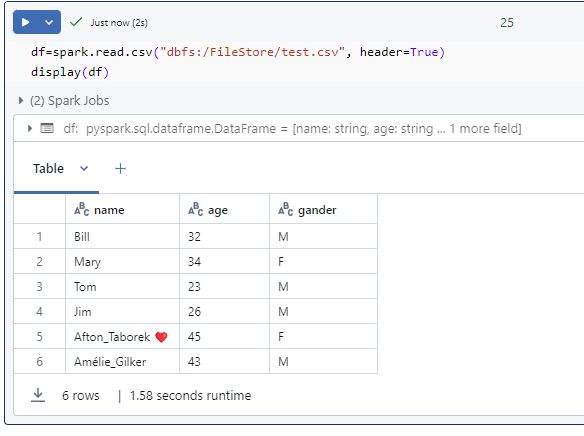
df = spark.read.csv(f"abfs://{container}@{storage_account_name }.dfs.windows.core.net/input/test.csv")

display(df)

# blob
display(spark.read.csv(f"abfs://{container}@{storage_account_name }.dfs.windows.core.net/input/test.csv"))
Of course, we are able to mount the ADLS to DBFS if we like; but it’s not necessary at this moment for demo.
A Service Principal in Azure is an identity used by applications, services, or automated tools to access specific Azure resources. It’s tied to an Azure App Registration and is used for managing permissions and authentication.
The Microsoft identity platform performs identity and access management (IAM) only for registered applications. Whether it’s a client application like a ADF or Synapse, Wen Application or mobile app, or it’s a web API that backs a client app, registering establishes a trust relationship between your application and the identity provider, the Microsoft identity platform.
This article is talking on registering an application in the Microsoft Entra admin center. I outline the registration procedure step by step.
Summary steps:
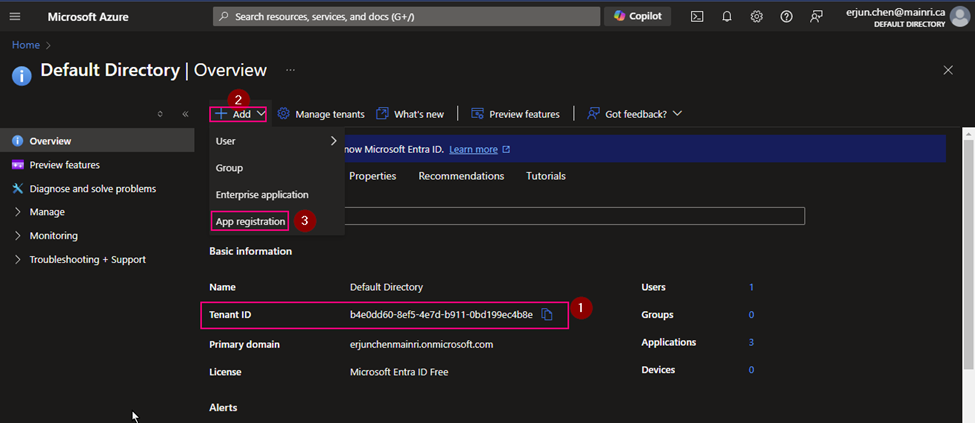
Navigate to Azure Entra ID (Azure Active Directory)
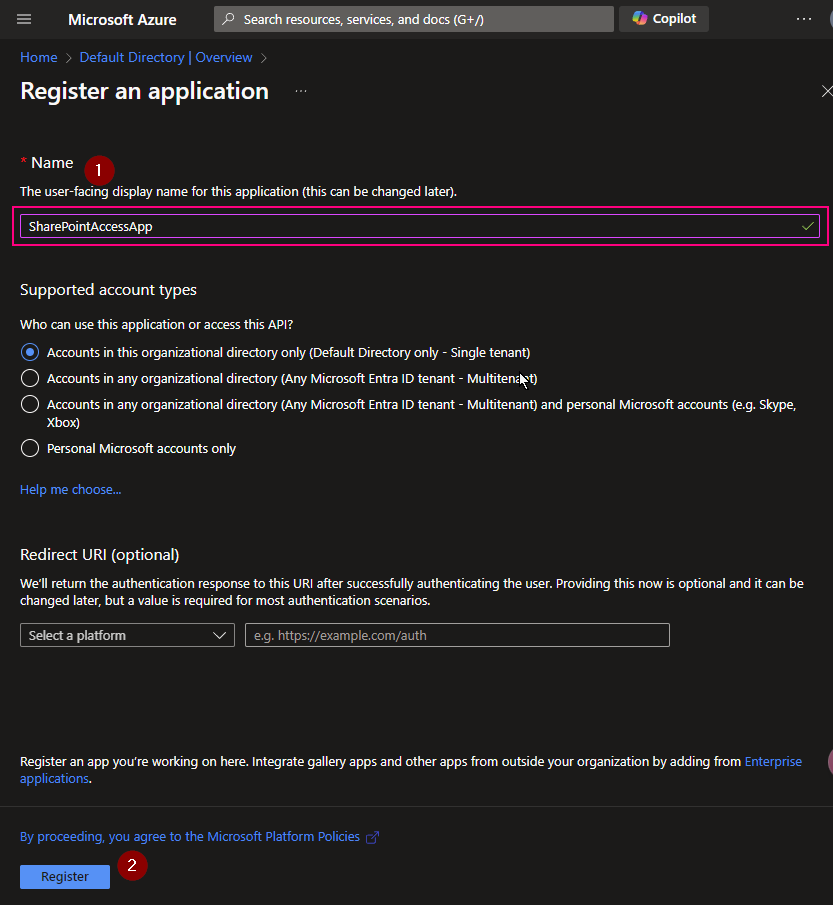
Create an App Registration
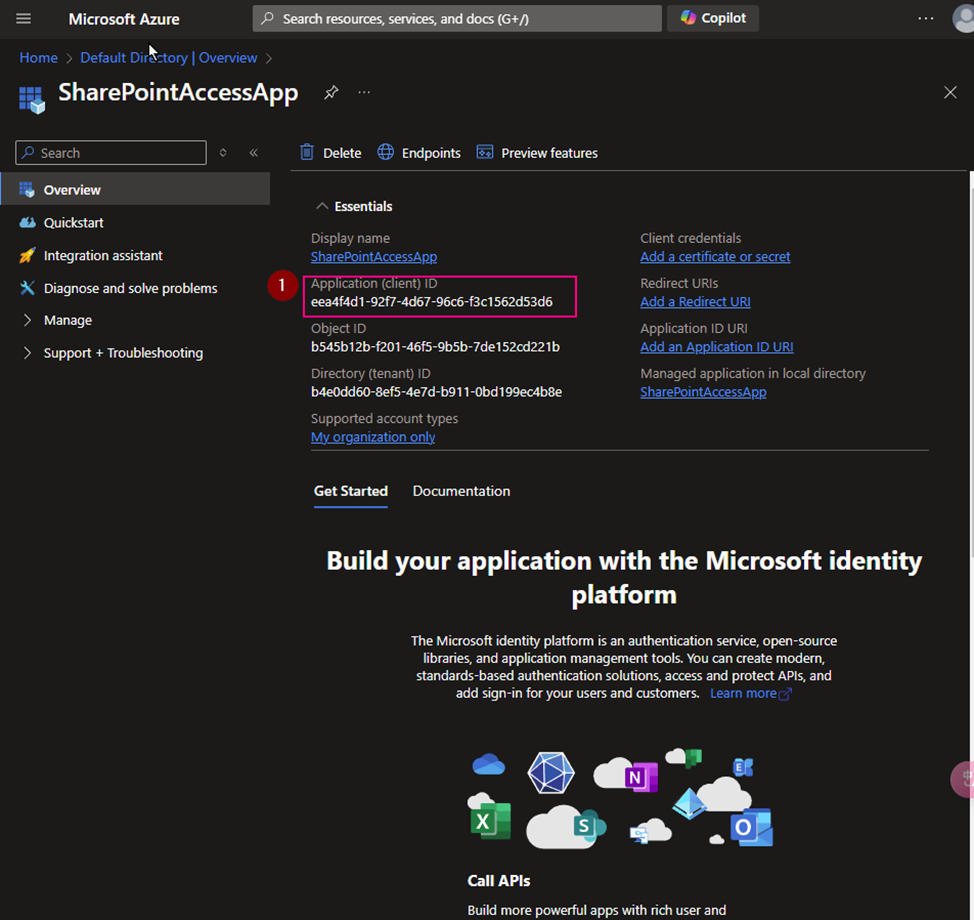
Generate Client Secret, note down Important the Application (client) ID and Directory (tenant) ID, Client-Secret-value.
Using the Service Principle – Assign Roles to the Service Principal Navigate to the Azure resource (e.g., Storage Account, Key Vault, SQL Database) you want your Service Principal to access.
Step by Step Demo
Register a new Application on Azure Entra ID (formerly called Azure Active Directory), get an Application ID and Client Secret value.
Azure Portal >> Azure Entra ID (formerly called Azure Active Directory)
(1) Copy Tenant ID.
We need this Tenant ID later.
(2) App Registration
(3) Copy Application ID. We will use it later
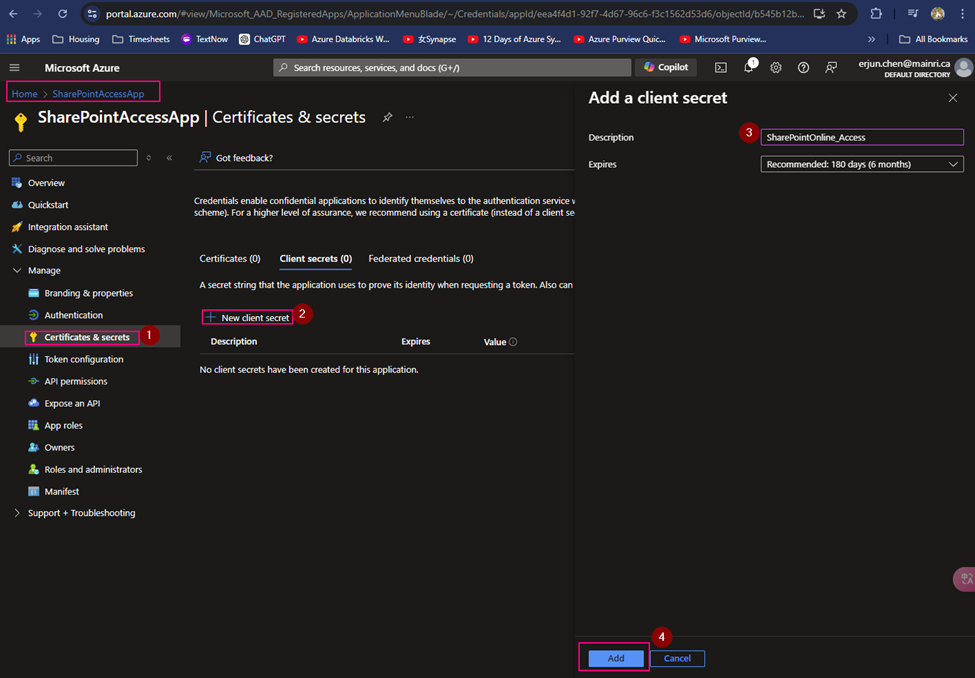
(4) Create Client Secret
Generate a new client Secret,
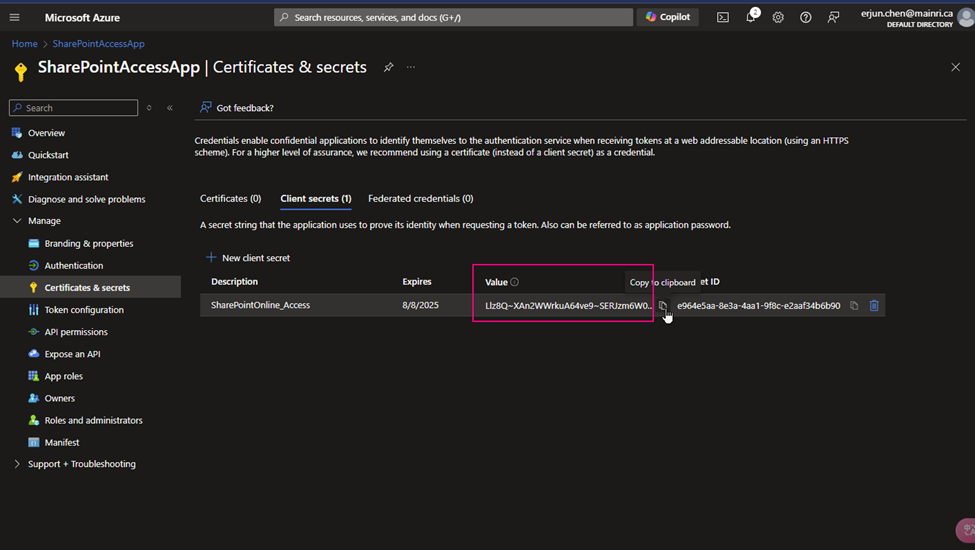
(5) copy the Client Secret Value
Copy client-secret-value, we need it later.
Cause: the Client Secret Value you HAVE TO COPY IT RIGHT NOW! IMMEDIATELY copy NOW. And put it to a secure place. Since the Value WILL NOT reappear anymore. IMOPRTANT!
(6) Using the Service Principle – Assign Roles to the Service Principal
Assign Roles to the Service Principal
Now, assign permissions to your Service Principal so it can access specific Azure resources:
Navigate to the Azure resource (e.g., Storage Account, Key Vault, SQL Database) you want your Service Principal to access.
Go to Access Control (IAM).
Click Add and choose Add role assignment.
Choose a role (e.g., Contributor, Reader, or a custom role).
Search for your App Registration by its name and select it.
Save
We have finished all at Azure Entra ID (Former Azure Active Directory)
Please do not hesitate to contact me if you have any questions at william . chen @mainri.ca