When your Delta tables reside in Blob Storage or Azure Data Lake Storage (ADLS), you interact with them directly using their file paths. This differs from how you might access tables managed within a metastore like Unity Catalog, where you’d use a cataloged name.
Reading Delta Tables from Blob Storage or ADLS
To read Delta tables from Blob Storage or ADLS, you specify the path to the Delta table and use the delta. format.
When writing to Delta tables, use the delta format and specify the path where you want to store the table.
Spark SQL cannot directly write to a Delta table in Blob or ADLS (use PySpark for this). However, you can run SQL queries and insert into a Delta table using INSERT INTO:
# SparkSQL
INSERT INTO delta.`/mnt/path/to/delta/table`SELECT * FROM my_temp_table
caution: " ` " - backticks

# PySpark
df.write.format("delta").mode("overwrite").save("path/to/delta/table")
Options and Parameters for Delta Read/Write
Options for Reading Delta Tables:
You can configure the read operation with options like:
mergeSchema: Allows schema evolution if the structure of the Delta table changes.
spark.sql.files.ignoreCorruptFiles: Ignores corrupt files during reading.
timeTravel: Enables querying older versions of the Delta table.
Delta supports time travel, allowing you to query previous versions of the data. This is very useful for audits or retrieving data at a specific point in time.
# Read from a specific version
df = spark.read.format("delta").option("versionAsOf", 2).load("path/to/delta/table")
df.show()

# Read data at a specific timestamp
df = spark.read.format("delta").option("timestampAsOf", "2024-10-01").load("path/to/delta/table")
df.show()
Conclusion:
Delta is a powerful format that works well with ADLS or Blob Storage when used with PySpark.
Ensure that you’re using the Delta Lake library to access Delta features, like ACID transactions, schema enforcement, and time travel.
For reading, use .format("delta").load("path").
For writing, use .write.format("delta").save("path").
Please do not hesitate to contact me if you have any questions at William . chen @ mainri.ca
To read from and write to Unity Catalog in PySpark, you typically work with tables registered in the catalog rather than directly with file paths. Unity Catalog tables can be accessed using the format catalog_name.schema_name.table_name.
Reading from Unity Catalog
To read a table from Unity Catalog, specify the table’s full path:
# Reading a table
df = spark.read.table("catalog.schema.table")
df.show()

# Using Spark SQL
df = spark.sql("SELECT * FROM catalog.schema.table")
Writing to Unity Catalog
To write data to Unity Catalog, you specify the table name in the saveAsTable method:
# Writing a DataFrame to a new table
df.write.format("delta") \
    .mode("overwrite") \
    .saveAsTable("catalog.schema.new_table")
Options for Writing to Unity Catalog:
format: Set to "delta" for Delta Lake tables, as Unity Catalog uses Delta format.
mode: Options include overwrite, append, ignore, and error.
Example: Read, Transform, and Write Back to Unity Catalog
# Read data from a Unity Catalog table
df = spark.read.table("catalog_name.schema_name.source_table")

# Perform transformations
transformed_df = df.filter(df["column_name"] > 10)

# Write transformed data back to a different table
transformed_df.write.format("delta") \
    .mode("overwrite") \
    .saveAsTable("catalog_name.schema_name.target_table")
Lacks built-in schema enforcement; additional steps needed for ACID or schema evolution.
Detailed Comparison and Notes:
Unity Catalog
Delta: Unity Catalog fully supports Delta format, allowing for schema evolution, ACID transactions, and built-in security and governance.
JSON and CSV: To use JSON or CSV in Unity Catalog, convert them into Delta tables or load them as temporary views before making them part of Unity’s governed catalog. This is because Unity Catalog enforces structured data formats with schema definitions.
Blob Storage & ADLS (Azure Data Lake Storage)
Delta: Blob Storage and ADLS support Delta tables if the Delta Lake library is enabled. Delta on Blob or ADLS retains most Delta features but may lack some governance capabilities found in Unity Catalog.
JSON & CSV: Both Blob and ADLS provide support for JSON and CSV formats, allowing flexibility with semi-structured data. However, they do not inherently support schema enforcement, ACID compliance, or governance features without Delta Lake.
Delta Table Benefits:
Schema Evolution and Enforcement: Delta enables schema evolution, essential in big data environments.
Time Travel: Delta provides versioning, allowing access to past versions of data.
ACID Transactions: Delta ensures consistency and reliability in large-scale data processing.
Please do not hesitate to contact me if you have any questions at William . chen @ mainri.ca
from_json() is a function used to parse a JSON string into a structured DataFrame format (such as StructType, ArrayType, etc.). It is commonly used to deserialize JSON strings stored in a DataFrame column into complex types that PySpark can work with more easily.
Syntax
from_json(column, schema, options={})
Parameters
column: The column containing the JSON string. Can be a string that refers to the column name or a column object.
schema
Specifies the schema of the expected JSON structure. Can be a StructType (or other types like ArrayType depending on the JSON structure).
options
allowUnquotedFieldNames: Allows field names without quotes. (default: false)
allowNumericLeadingZeros: Allows leading zeros in numbers. (default: false)
allowBackslashEscapingAnyCharacter: Allows escaping any character with a backslash. (default: false)
mode: Controls how to handle malformed records PERMISSIVE: The default mode that sets null values for corrupted fields. DROPMALFORMED: Discards rows with malformed JSON strings. FAILFAST: Fails the query if any malformed records are found.
Sample DF
+----------------------------+
|json_string                 |
+----------------------------+
|{"name": "John", "age": 30} |
|{"name": "Alice", "age": 25}|
+----------------------------+


from pyspark.sql.types import StructType, StructField, StringType, IntegerType, StructType
from pyspark.sql.functions import from_json, col
# Define the schema for the nested JSON
schema = StructType([
    StructField("name", StructType([
        StructField("first", StringType(), True),
        StructField("last", StringType(), True)
    ]), True),
    StructField("age", IntegerType(), True)
])

# Parse the JSON string into structured columns
df_parsed = df.withColumn("parsed_json", from_json(col("json_string"), schema))

# Display the parsed JSON
df_parsed.select("parsed_json.*").show(truncate=False)
+--------+---+
| name   |age|
+--------+---+
|{John, Doe}|30|
|{Alice, Smith}|25|
+--------+---+
to_json()
to_json() is a function that converts a structured column (such as one of type StructType, ArrayType, etc.) into a JSON string.
Syntax
to_json(column, options={})
Parameters
column: The column you want to convert into a JSON string. The column should be of a complex data type, such as StructType, ArrayType, or MapType. Can be a column name (as a string) or a Column object.
options
pretty: If set to true, it pretty-prints the JSON output.
dateFormat: Specifies the format for DateType and TimestampType columns (default: yyyy-MM-dd).
timestampFormat: Specifies the format for TimestampType columns (default: yyyy-MM-dd'T'HH:mm:ss.SSSXXX).
ignoreNullFields: When set to true, null fields are omitted from the resulting JSON string (default: true).
compression: Controls the compression codec used to compress the JSON output, e.g., gzip, bzip2.
StructType() in PySpark is part of the pyspark.sql.types module and it is used to define the structure of a DataFrame schema. StructField () is a fundamental part of PySpark’s StructType, used to define individual fields (columns) within a schema. A StructField specifies the name, data type, and other attributes of a column in a DataFrame schema.
fields (optional): A list of StructField objects that define the schema. Each StructField object specifies the name, type, and whether the field can be null.
Key Components
name: The name of the column.
dataType: The data type of the column (e.g., StringType(), IntegerType(), DoubleType(), etc.).
nullable: Boolean flag indicating whether the field can contain null values (True for nullable).
Common Data Types Used in StructField
StringType(): Used for string data.
IntegerType(): For integers.
DoubleType(): For floating-point numbers.
LongType(): For long integers.
ArrayType(): For arrays (lists) of values.
MapType(): For key-value pairs (dictionaries).
TimestampType(): For timestamp fields.
BooleanType(): For boolean values (True/False).
from pyspark.sql import SparkSession
from pyspark.sql.types import StructType, StructField, StringType, IntegerType
# Initialize Spark session
spark = SparkSession.builder.appName("Example").getOrCreate()
# Define schema using StructTypeschema = StructType([
StructField("name", StringType(), True),
StructField("age", IntegerType(), True)
])
# Create DataFrame using the schema
data = [("John", 30), ("Alice", 25)]
df = spark.createDataFrame(data, schema)
df.show()
+-----+---+
| name|age|
+-----+---+
| John| 30|
|Alice| 25|
+-----+---+
Nested Schema
StructType can define a nested schema. For example, a column in the DataFrame might itself contain multiple fields.
The contains() function in PySpark is used to check if a string column contains a specific substring. It’s typically used in a filter() or select() operation to search within the contents of a column and return rows where the condition is true.
Syntax
Column.contains(substring: str)
Key Points
contains() is case-sensitive by default. For case-insensitive matching, use it with lower() or upper().
It works on string columns only. For non-string columns, you would need to cast the column to a string first.
The collect () function simply gathers all rows from the DataFrame or RDD and returns them as a list of Row objects. It does not accept any parameters.
Syntax
DataFrame.collect() not any parameter at all
Key Points
Use on Small Data: Since collect() brings all the data to the driver, it should be used only on small datasets. If you try to collect a very large dataset, it can cause memory issues or crash the driver..
For large datasets, consider using alternatives like take(n), toPandas(), show(n)
sample DF
+-------+---+
|   Name|Age|
+-------+---+
|  Alice| 25|
|    Bob| 30|
|Charlie| 35|
+-------+---+

# Collect all rows from the DataFrame
collected_data = df.collect()

# Access all rows
print(collected_data)
[Row(Name='Alice', Age=25), Row(Name='Bob', Age=30), Row(Name='Charlie', Age=35)]

# Access a row
print(collected_data[0])
Row(Name='Alice', Age=25)

# Access a cell
print(collected_data[0][0])
Alice

# Display the collected data
for row in collected_data:
    print(row)
==output==
Row(Name='Alice', Age=25)
Row(Name='Bob', Age=30)
Row(Name='Charlie', Age=35)

# Filter and collect
filtered_data = df.filter(df["Age"] > 30).collect()

# Process collected data
for row in filtered_data:
    print(f"{row['Name']} is older than 30.")
==output==
Charlie is older than 30.


# Access specific columns from collected data
for row in collected_data:
    print(f"Name: {row['Name']}, Age: {row.Age}")
==output==
Name: Alice, Age: 25
Name: Bob, Age: 30
Name: Charlie, Age: 35
transform ()
The transform () function in PySpark is a higher-order function introduced to apply custom transformations to columns in a DataFrame. It allows you to perform a transformation function on an existing column, returning the transformed data as a new column. It is particularly useful when working with complex data types like arrays or for applying custom logic to column values.
Syntax
df1 = df.transform(my_function)
Parameters
my_function: a python function
Key point
The transform() method takes a function as an argument. It automatically passes the DataFrame (in this case, df) to the function. So, you only need to pass the function name “my_function"
sample DF
+-------+---+
|   Name|Age|
+-------+---+
|  Alice| 25|
|    Bob| 30|
|Charlie| 35|
+-------+---+

from pyspark.sql.functions import upper
#Declare my function
def addTheAge(mydf):
    return mydf.withColumn('age',mydf.age + 2)

def upcaseTheName(mydf):
    reture mydf.withColumn("Name", upper(mydf.Name))

#transforming: age add 2 years
df1=df.transform(addTheAge)
df1.show()
+-------+---+
|   Name|Age|
+-------+---+
|  Alice| 27|
|    Bob| 32|
|Charlie| 37|
+-------+---+

The transform () method takes a function as an argument. It automatically passes the DataFrame (in this case, df) to the function. So, you only need to pass the function name "my_function".


#transforming to upcase
df1=df.transform(upcaseTheName)
df1.show()
+-------+---+
|   Name|Age|
+-------+---+
|  ALICE| 25|
|    BOB| 30|
|CHARLIE| 35|
+-------+---+

#transforming to upcase and age add 2 years
df1=df.transform(addTheAge).transform(upcaseTheName)
df1.show()
+-------+---+
|   Name|Age|
+-------+---+
|  ALICE| 27|
|    BOB| 32|
|CHARLIE| 37|
+-------+---+
udf()
The udf (User Defined Function) allows you to create custom transformations for DataFrame columns using Python functions. You can use UDFs when PySpark’s built-in functions don’t cover your use case or when you need more complex logic.
Syntax
from pyspark.sql.functions import udf from pyspark.sql.types import DataType # Define a UDF function , # Register the function as a UDF my_udf = udf(py_function, returnType)
Parameters
py_function: A Python function you define to transform the data.
returnType: PySpark data type (e.g., StringType(), IntegerType(), DoubleType(), etc.) that indicates what type of data your UDF returns.
StringType(): For returning strings.
IntegerType(): For integers.
FloatType(): For floating-point numbers.
BooleanType(): For booleans.
ArrayType(DataType): For arrays.
StructType(): For structured data.
Key point
You need to specify the return type for the UDF, as PySpark needs to understand how to handle the results of the UDF.
sample DF
+-------+---+
|   Name|Age|
+-------+---+
|  Alice| 25|
|    Bob| 30|
|Charlie| 35|
+-------+---+


from pyspark.sql import SparkSession
from pyspark.sql.functions import udf
from pyspark.sql.types import StringType

# Define a Python function
def to_upper(name):
    return name.upper()

# Register the function as a UDF, specifying the return type as StringType
uppercase_udf = udf(to_upper, StringType())

# Apply the UDF using withColumn
df_upper = df.withColumn("Upper_Name", uppercase_udf(df["Name"]))

df_upper.show()
+-------+---+----------+
|   Name|Age|Upper_Name|
+-------+---+----------+
|  Alice| 25|     ALICE|
|    Bob| 30|       BOB|
|Charlie| 35|   CHARLIE|
+-------+---+----------+

# UDF Returning Boolean
from pyspark.sql.functions import udf
from pyspark.sql.types import BooleanType
# Define a Python function
def is_adult(age):
    return age > 30

# Register the UDF
is_adult_udf = udf(is_adult, BooleanType())

# Apply the UDF
df_adult = df.withColumn("Is_Adult", is_adult_udf(df["Age"]))

# Show the result
df_adult.show()
+-------+---+--------+
|   Name|Age|Is_Adult|
+-------+---+--------+
|  Alice| 25|   false|
|    Bob| 30|   false|
|Charlie| 35|    true|
+-------+---+--------+

# UDF with Multiple Columns (Multiple Arguments)
from pyspark.sql.functions import udf
from pyspark.sql.types import StringType

# Define a Python function that concatenates two columns
def concat_name_age(name, age):
    return f"{name} is {age} years old"

# Register the UDF
concat_udf = udf(concat_name_age, StringType())

# Apply the UDF to multiple columns
df_concat = df.withColumn("Description", concat_udf(df["Name"], df["Age"]))

# Show the result
df_concat.show()
+-------+---+--------------------+
|   Name|Age|         Description|
+-------+---+--------------------+
|  Alice| 25|Alice is 25 years...|
|    Bob| 30| Bob is 30 years old|
|Charlie| 35|Charlie is 35 yea...|
+-------+---+--------------------+
spark.udf.register(),Register for SQL query
in PySpark, you can use spark.udf.register() to register a User Defined Function (UDF) so that it can be used not only in DataFrame operations but also in SQL queries. This allows you to apply your custom Python functions directly within SQL statements executed against your Spark session.
registered_pyFun_for_sql: The name of the UDF, which will be used in SQL queries.
original_pyFun: The original Python function that contains the custom logic.
returnType: The return type of the UDF, which must be specified (e.g., StringType(), IntegerType()).
smaple df
+-------+---+
|   Name|Age|
+-------+---+
|  Alice| 25|
|    Bob| 30|
|Charlie| 35|
+-------+---+

from pyspark.sql import SparkSession
from pyspark.sql.types import StringType

# Register the DataFrame as a SQL temporary view
df.createOrReplaceTempView("people")

# Define a Python function
def original_myPythonFun(name):
    return name.upper()

# Register the function as a UDF for SQL with the return type StringType
spark.udf.register("registered_pythonFun_for_sql"\
                    , original_myPythonFun\
                    , StringType()\
                )

# Use the UDF - "registered_pythonFun_for_sql" in a SQL query
result = spark.sql(\
    "SELECT Name, registered_pythonFun_for_sql(Name) AS Upper_Name \
        FROM people"\
    )
result.show()
+-------+----------+
|   Name|Upper_Name|
+-------+----------+
|  Alice|     ALICE|
|    Bob|       BOB|
|Charlie|   CHARLIE|
+-------+----------+

we can directly use SQL style with magic %sql

%sql
SELECT Name
      , registered_pythonFun_for_sql(Name) AS Upper_Name
  FROM people
+-------+----------+
|   Name|Upper_Name|
+-------+----------+
|  Alice|     ALICE|
|    Bob|       BOB|
|Charlie|   CHARLIE|
+-------+----------+
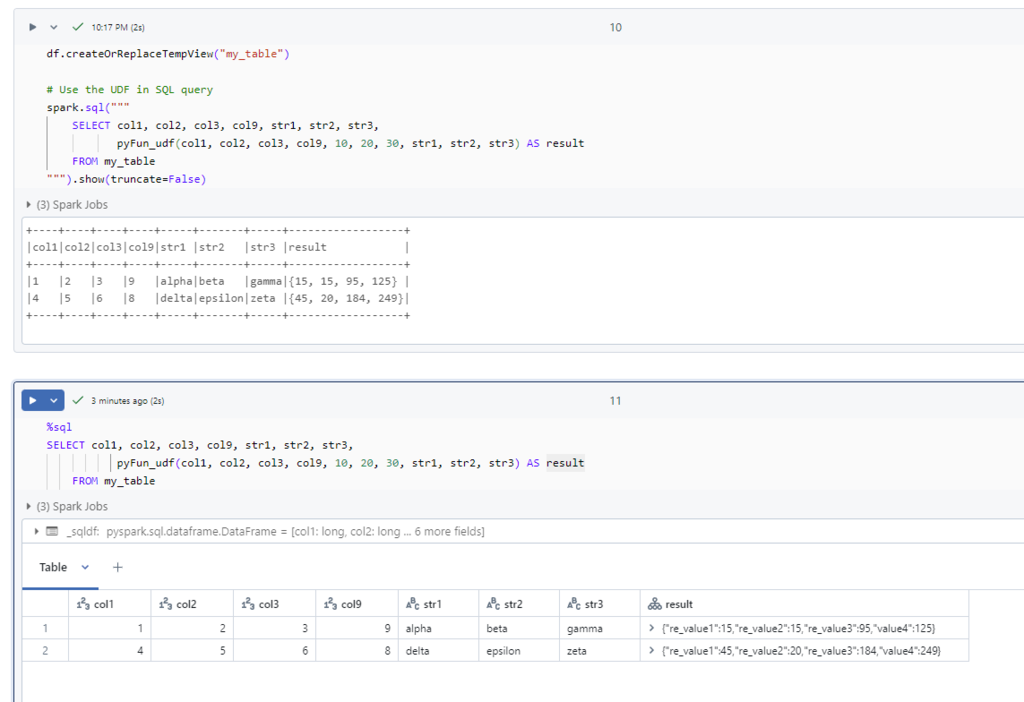
A complex python function declares, udf register, and apply example
Define the Python function to handle multiple columns and scalars
# Define the Python function to handle multiple columns and scalars

def pyFun(col1, col2, col3, col9, int1, int2, int3, str1, str2, str3):
    # Example business logic
    re_value1 = col1 * int1 + len(str1)
    re_value2 = col2 + col9 + len(str2)
    re_value3 = col3 * int3 + len(str3)
    value4 = re_value1 + re_value2 + re_value3

    # Return multiple values as a tuple
    return re_value1, re_value2, re_value3, value4
Define the return schema for the UDF
# Define the return schema for the UDF

return_schema = StructType([
    StructField("re_value1", IntegerType(), True),
    StructField("re_value2", IntegerType(), True),
    StructField("re_value3", IntegerType(), True),
    StructField("value4", IntegerType(), True)
])
Register the UDF
# register the UDF

# for SQL use this
# spark.udf.register("pyFun_udf", pyFun, returnType=return_schema)

pyFun_udf = udf(pyFun, returnType=return_schema)
Apply the UDF to the DataFrame, using ‘lit()’ for constant values
# Apply the UDF to the DataFrame, using 'lit()' for constant values

df_with_udf = df.select(
    col("col1"),
    col("col2"),
    col("col3"),
    col("col9"),
    col("str1"),
    col("str2"),
    col("str3"),
    pyFun_udf(
        col("col1"),
        col("col2"),
        col("col3"),
        col("col9"),
        lit(10),  # Use lit() for the constant integer values
        lit(20),
        lit(30),
        col("str1"),
        col("str2"),
        col("str3")
    ).alias("result")
)

# Show the result
df_with_udf.show(truncate=False)

==output==
+----+----+----+----+-----+-------+-----+------------------+
|col1|col2|col3|col9|str1 |str2   |str3 |result            |
+----+----+----+----+-----+-------+-----+------------------+
|1   |2   |3   |9   |alpha|beta   |gamma|{15, 15, 95, 125} |
|4   |5   |6   |8   |delta|epsilon|zeta |{45, 20, 184, 249}|
+----+----+----+----+-----+-------+-----+------------------+
The join() method is used to combine two DataFrames based on a common column or multiple columns. This method is extremely versatile, supporting various types of SQL-style joins such as inner, outer, left, and right joins.
Syntax
DataFrame.join(other, on=None, how=None)
Parameters
other: The other DataFrame to join with the current DataFrame.
on: A string or a list of column names on which to join. This can also be an expression (using col() or expr()).
how: The type of join to perform. It can be one of
'inner': Inner join (default). Returns rows that have matching values in both DataFrames.
'outer' or 'full': Full outer join. Returns all rows from both DataFrames, with null values for missing matches.
'left' or 'left_outer': Left outer join. Returns all rows from the left DataFrame and matched rows from the right DataFrame. Unmatched rows from the right DataFrame result in null values.
'right' or 'right_outer': Right outer join. Returns all rows from the right DataFrame and matched rows from the left DataFrame. Unmatched rows from the left DataFrame result in null values.
'left_semi': Left semi join. Returns only the rows from the left DataFrame where the join condition is satisfied.
'left_anti': Left anti join. Returns only the rows from the left DataFrame where no match is found in the right DataFrame.
'cross': Cross join (Cartesian product). Returns the Cartesian product of both DataFrames, meaning every row from the left DataFrame is combined with every row from the right DataFrame.
Others are the same as SQL. new, let’s focus on Semi and Anti Joins
Left Semi Join: Only returns rows from the left DataFrame that have matches in the right DataFrame.
Left Anti Join: Only returns rows from the left DataFrame that don’t have matches in the right DataFrame.
# Left semi join
df_left_semi = df1.join(df2, on="dept_id", how="left_semi")
df_left_semi.show()

==output==
+-------+-----+
|dept_id| name|
+-------+-----+
|      1|Alice|
|      2|  Bob|
+-------+-----+
Charlie's dep_Id=3. it does not appear in df2, so skipped it.


# Left anti join
df_left_anti = df1.join(df2, on="dept_id", how="left_anti")
df_left_anti.show()

==output==
+-------+-------+
|dept_id|   name|
+-------+-------+
|      3|Charlie|
+-------+-------+
Only Charlie, dep_Id=3, does not appear in df2, so return it only.
union ()
The union() method is used to combine two DataFrames with the same schema (i.e., same number and type of columns). This operation concatenates the rows of the two DataFrames, similar to a SQL UNION operation, but without removing duplicate rows (like UNION ALL in SQL).
Syntax
DataFrame.union(other)
Key Points
Schema Compatibility: Both DataFrames must have the same number of columns, and the data types of the corresponding columns must match.
Union Behavior: Unlike SQL’s UNION which removes duplicates, union() in PySpark keeps all rows, including duplicates. This is equivalent to SQL’s UNION ALL.
Order of Rows: The rows from the first DataFrame will appear first, followed by the rows from the second DataFrame.
Column Names and Data Types Must Match: The column names don’t need to be identical in both DataFrames, but their positions and data types must match. If the number of columns or the data types don’t align, an error will be raised.
Union with Different Column Names: Even though column names don’t need to be the same, the columns are merged by position, not by name. If you attempt to union() DataFrames with different column orders, the results could be misleading. Therefore, it’s important to make sure the schemas match.
The unionByName() method in PySpark is similar to the union() method but with a key distinction: it merges two DataFrames by aligning columns based on column names, rather than their positions.
other: The other DataFrame to be unioned with the current DataFrame.
allowMissingColumns: A boolean flag (False by default). If True, this allows the union of DataFrames even if one DataFrame has columns that are missing in the other. The missing columns in the other DataFrame will be filled with null values.
Key Points
Column Name Alignment: The method aligns columns by name, not by their position, which makes it flexible for combining DataFrames that have different column orders.
Handling Missing Columns: By default, if one DataFrame has columns that are missing in the other, PySpark will throw an error. However, setting allowMissingColumns=True allows unioning in such cases, and missing columns in one DataFrame will be filled with null values in the other.
Duplicate Rows: Just like union(), unionByName() does not remove duplicates, and the result includes all rows from both DataFrames.
unionAll() was an older method used to combine two DataFrames without removing duplicates. However, starting from PySpark 2.0, unionAll() has been deprecated and replaced by union(). The behavior of unionAll() is now identical to that of union() in PySpark.
look at union () in detail.
fillna (), df.na.fill()
fillna() is a method used to replace null (or missing) values in a DataFrame with a specified value. Return new DataFrame with null values replaced by the specified value.
Syntax
DataFrame.fillna(value, subset=None)
df.na.fill(value, subset=None)
df.na.fill(value, subset=None) has the result of df.fillna().
Parameters
value: The value to replace null with. It can be a scalar value (applied across all columns) or a dictionary (to specify column-wise replacement values). The type of value should match the type of the column you are applying it to (e.g., integers for integer columns, strings for string columns).
subset: Specifies the list of column names where the null values will be replaced. If not provided, the replacement is applied to all columns.
sample df
+-------+----+----+
|   name| age|dept|
+-------+----+----+
|  Alice|  25|null|
|    Bob|null|  HR|
|Charlie|  30|null|
+-------+----+----+

df.printSchema()
root
 |-- name: string (nullable = true)
 |-- age: long (nullable = true)
 |-- dept: string (nullable = true)

"age" is long, "dept" is string

# Fill null values with default values for all columns
df_filled = df.fillna(0)

==output==
+-------+---+----+
|   name|age|dept|
+-------+---+----+
|  Alice| 25|null|
|    Bob|  0|  HR|
|Charlie| 30|null|
+-------+---+----+
Bob's age is filled with 0, since it is "long", and "Dept" column did not fill, still remains "null".
Handle different Columns with different data type
# Fill nulls in the 'age' column with 0 and in the 'dept' column with "Unknown"
df_filled_columns = df.fillna({"age": 0, "dept": "Unknown"})

df_filled_columns.show()

==output==
+-------+---+-------+
|   name|age|   dept|
+-------+---+-------+
|  Alice| 25|Unknown|
|    Bob|  0|     HR|
|Charlie| 30|Unknown|
Fill Nulls in Specific Subset of Columns
# Fill null values only in the 'age' column
df_filled_age = df.fillna(0, subset=["age"])

df_filled_age.show()
+-------+---+----+
|   name|age|dept|
+-------+---+----+
|  Alice| 25|null|
|    Bob|  0|  HR|
|Charlie| 30|null|
+-------+---+----+
select()
select() is used to project a subset of columns from a DataFrame or to create new columns based on expressions. It returns a new DataFrame containing only the selected columns or expressions.
distinct () is used to remove duplicate rows from a DataFrame or RDD, leaving only unique rows. It returns a new DataFrame that contains only unique rows from the original DataFrame.
dropDuplicates () is used to remove duplicate rows from a DataFrame based on one or more specific columns.
Syntax:
DataFrame.dropDuplicates([col1, col2, …, coln])
Parameters
cols (optional): This is a list of column names based on which you want to drop duplicates. If no column names are provided, dropDuplicates() will behave similarly to distinct(), removing duplicates across all columns.
# Drop duplicates across all columns (similar to distinct)
df_no_duplicates = df.dropDuplicates()

==output==
+-------+---+
|   name|age|
+-------+---+
|  Alice| 25|
|    Bob| 30|
|Charlie| 35|
+-------+---+

# Drop duplicates based on the "name" column
df_unique_names = df.dropDuplicates(["name"])

==output==
+-------+---+
|   name|age|
+-------+---+
|  Alice| 25|
|    Bob| 30|
|Charlie| 35|
+-------+---+
In the second case, only the first occurrence of each name is kept, while duplicates are removed, regardless of other columns.
orderBy(), sort ()
orderBy() or sort () method is used to sort the rows of a DataFrame based on one or more columns in ascending or descending order. It is equivalent to the SQL ORDER BY clause. The method returns a new DataFrame that is sorted based on the provided column(s).
In PySpark, both orderBy() and sort() methods are available, and they are essentially aliases of each other, with no functional difference. You can use either based on preference:
# Group by department and count the number of employees in each department
df_grouped = df.groupBy("department").count()

==output==
+----------+-----+
|department|count|
+----------+-----+
|     Sales|    3|
|        HR|    2|
+----------+-----+

# Group by multiple columns
original dataset
+-------+----------+------+
|   name|department|gender|
+-------+----------+------+
|  Alice|     Sales|Female|
|    Bob|     Sales|  Male|
|Charlie|        HR|  Male|
|  David|        HR|  Male|
|    Eve|     Sales|Female|
+-------+----------+------+

# Group by department and gender, then count the number of employees in each group
df_grouped_multi = df.groupBy("department", "gender").count()

+----------+------+-----+
|department|gender|count|
+----------+------+-----+
|     Sales|Female|    2|
|     Sales|  Male|    1|
|        HR|  Male|    2|
+----------+------+-----+
agg ()
agg() function in PySpark is used for performing aggregate operations on a DataFrame, such as computing sums, averages, counts, and other aggregations. it is often used in combination with groupBy() to perform group-wise aggregations.
Syntax:
from pyspark.sql.functions import sum, avg, count, max, min DataFrame.agg(*exprs)
This can be a string representing the data type (e.g., "int", "double", "string", etc.) or a PySpark DataType object (like IntegerType(), StringType(), FloatType(), etc.).
Common Data Types:
IntegerType(), "int": For integer values.
DoubleType(), "double": For double (floating-point) values.
FloatType(), "float": For floating-point numbers.
StringType(), "string": For text or string values.
DateType(), "date": For date values.
TimestampType(), "timestamp": For timestamps.
BooleanType(), "boolean": For boolean values (true/false).
from pyspark.sql.functions import col

# Cast a string column to integer
df1 = df.withColumn("age_int", col("age").cast("int"))
df1.printSchema()

==output==
root
 |-- id: long (nullable = true)
 |-- age: long (nullable = true)
 |-- age_int: integer (nullable = true)


# Cast 'id' from long to string and 'age' from long to double
df_casted = df.withColumn("id", col("id").cast("int")) \
              .withColumn("age", col("age").cast("double"))
df_casted.show()
df_casted.printSchema()

==output==
+---+----+
| id| age|
+---+----+
|  1|25.0|
|  2|12.0|
|  3|40.0|
+---+----+

root
 |-- id: string (nullable = true)
 |-- age: double (nullable = true)
filter (), where (),
filter () or where () function is used to filter rows from a DataFrame based on a condition or set of conditions. It works similarly to SQL’s WHERE clause,
df.filter(condition) df.where(condition)
Condition (for ‘filter’)
& (AND)
| (OR)
~ (NOT)
== (EQUAL)
all “filter” can change to “where”, vice versa.
sample dataframe
+------+---+-------+
|  Name|Age|Salary|
+------+---+-------+
| Alice| 30|  50000|
|   Bob| 25|  30000|
|Alicia| 40|  80000|
|   Ann| 32|  35000|
+------+---+-------+

# Filter rows where age is greater than 30 AND salary is greater than 50000
df.filter((df["age"] > 30) & (df["salary"] > 50000))
df.where((df["age"] > 30) & (df["salary"] > 50000))

+------+---+------+
|  Name|Age|Salary|
+------+---+------+
|Alicia| 40| 80000|
+------+---+------+

# Filter rows where age is less than 25 OR salary is less than 40000
df.filter((df["age"] < 25) | (df["salary"] < 40000))
df.where((df["age"] < 25) | (df["salary"] < 40000))

+----+---+------+
|Name|Age|Salary|
+----+---+------+
| Bob| 25| 30000|
| Ann| 32| 35000|
+----+---+------+
like ()
like() function is used to perform pattern matching on string columns, similar to the SQL LIKE operator
df.filter(df[“column_name”].like(“pattern”))
Pattern
%: Represents any sequence of characters.
_: Represents a single character.
pattern is case sensitive.
sample dataframe
+------+---+
|  Name|Age|
+------+---+
| Alice| 30|
|   Bob| 25|
|Alicia| 28|
|   Ann| 32|
+------+---+


# Filtering names that start with 'Al'
df.filter(df["Name"].like("Al%")).show()

+------+---+
|  Name|Age|
+------+---+
| Alice| 30|
|Alicia| 28|
+------+---+

# Filtering names that end with 'n'
df.filter(df["Name"].like("%n")).show()

+----+---+
|Name|Age|
+----+---+
| Ann| 32|
+----+---+

# Filtering names that contain 'li'
df.filter(df["Name"].like("%li%")).show()

+------+---+
|  Name|Age|
+------+---+
| Alice| 30|
|Alicia| 28|
+------+---+

# Filtering names where the second letter is 'l'
df.filter(df["Name"].like("A_l%")).show()

+----+---+
|Name|Age|
+----+---+
+----+---+
nothing found in this pattern
Please do not hesitate to contact me if you have any questions at William . chen @ mainri.ca
In PySpark, there isn’t an explicit “if-else" statement construct like in regular Python. Instead, PySpark provides several ways to implement conditional logic using functions such as when (), otherwise (), withColumn(),expr (), UDF etc.
using when (), expr() look at following sections. now focus on UDF to implement “if — then — else –” logic”.
from pyspark.sql.functions import udf
from pyspark.sql.types import StringType

# Define a Python function for age classification
def classify_age(age):
    if age >= 18:
        return 'Adult'
    else:
        return 'Minor'

# Register the function as a UDF
classify_age_udf = udf(classify_age, StringType())

# Create the DataFrame
data = [(1, 25), (2, 12), (3, 40)]
df = spark.createDataFrame(data, ["id", "age"])
+---+---+
| id|age|
+---+---+
|  1| 25|
|  2| 12|
|  3| 40|
+---+---+

# Apply the UDF to create a new column with the if-else logic
df = df.withColumn("age_group", classify_age_udf(df["age"]))

df.show()
+---+---+---------+
| id|age|age_group|
+---+---+---------+
|  1| 25|    Adult|
|  2| 12|    Minor|
|  3| 40|    Adult|
+---+---+---------+
In this example:
The function classify_age behaves like a Python if-else statement.
The UDF (classify_age_udf) applies this logic to the DataFrame.
when (), otherwise ()
when function in PySpark is used for conditional expressions, similar to SQL’s CASE WHEN clause.
Syntax
from pyspark.sql.functions import when when(condition, value).otherwise(default_value)
Parameters
condition: A condition that returns a boolean (True/False). If this condition is true, the function will return the specified value.
value: The value to return when the condition is true.
otherwise(default_value): An optional method that specifies the default value to return when the condition is false.
The expr () function allows you to use SQL expressions as a part of the DataFrame transformation logic.
Syntax
expr () from pyspark.sql.functions import expr expr(sql_expression)
Parameters:
sql_expression: A string containing a SQL-like expression to be applied to the DataFrame. It can contain any valid SQL operations, such as arithmetic operations, column references, conditional logic, or function calls.
The selectExpr() method allows you to directly select columns or apply SQL expressions on multiple columns simultaneously, similar to SQL’s SELECT statement.
Syntax
from pyspark.sql.functions import selectExpr
df.selectExpr(*sql_expressions)
Parameters:
sql_expression: A list of SQL-like expressions (as strings) that define how to transform or select columns. Each expression can involve selecting a column, renaming it, applying arithmetic, or adding conditions using SQL syntax.
from pyspark.sql.functions import selectExpr

# Select specific columns and rename them using selectExpr()
df = df.selectExpr("id", "value * 2 as double_value", "value as original_value")

df.show()

==output==
+---+------------+--------------+
| id|double_value|original_value|
+---+------------+--------------+
|  1|          20|            10|
|  2|          40|            20|
|  3|          60|            30|
+---+------------+--------------+

# Use CASE WHEN to categorize values
df = df.selectExpr("id", "value", "CASE WHEN value >= 20 THEN 'High' ELSE 'Low' END as category")

df.show()
+---+-----+--------+
| id|value|category|
+---+-----+--------+
|  1|   10|     Low|
|  2|   20|    High|
|  3|   30|    High|
+---+-----+--------+

# Apply multiple transformations and expressions
df = df.selectExpr("id", "value", "value * 2 as double_value", "CASE WHEN value >= 20 THEN 'High' ELSE 'Low' END as category")

df.show()
+---+-----+------------+--------+
| id|value|double_value|category|
+---+-----+------------+--------+
|  1|   10|          20|     Low|
|  2|   20|          40|    High|
|  3|   30|          60|    High|
+---+-----+------------+--------+
comparison: expr () and selectExpr ()
Key Differences expr () is used when you want to apply SQL-like expressions in the middle of a transformation, typically within withColumn() or filter(). selectExpr() is used when you want to apply multiple expressions in a single statement to transform and select columns, much like a SQL SELECT statement.
Feature
expr()
selectExpr()
Purpose
Used for applying single SQL expressions
Used for applying multiple SQL expressions
Typical Usage
Inside select(), withColumn(), filter()
As a standalone method for multiple expressions
Operates On
Individual column expressions
Multiple expressions at once
Flexibility
Allows complex operations on a single column
Simpler for multiple transformations
Example
df.select(expr("age + 5").alias("new_age"))
df.selectExpr("age + 5 as new_age", "age * 2")
Use Case
Fine-grained control of expressions in various transformations
Quickly apply and select multiple expressions as new columns
Conclusion expr (): Ideal for transforming or adding individual columns using SQL expressions. selectExpr (): Useful for selecting, renaming, and transforming multiple columns at once using SQL-like syntax.
na.fill ()
na.fill(): Used to replace null values in DataFrames.
#Fill null values in a specific column with a default value (e.g., 0)
df = df.na.fill({"value": 0})

df.show()
==output==
+---+-----+
| id|value|
+---+-----+
|  1|   10|
|  2|   20|
|  3|   30|
|  4|    0|
+---+-----+
coalescs ()
coalesce function is used to return the first non-null value among the columns you provide
Syntax
from pyspark.sql.functions import coalesce coalesce(col1, col2, …, colN)
from pyspark.sql.functions import coalesce

# Return the first non-null value from multiple columns
df = df.withColumn("first_non_null", coalesce(col("column1"), col("column2"), col("column3")))
isin ()
isin function is used to check if a value belongs to a list or set of values.
Syntax from pyspark.sql.functions import col col(“column_name”).isin(value1, value2, …, valueN)
from pyspark.sql.functions import col
# Check if the value is between 20 and 30
df = df.withColumn("value_between_20_and_30", col("value").between(20, 30)).show()

df.show()
==output==
+---+-----+-----------------------+
| id|value|value_between_20_and_30|
+---+-----+-----------------------+
|  1|   15|                  false|
|  2|   20|                   true|
|  3|   30|                   true|
|  4|   36|                  false|

note: it included boundary value - "20" and "30"
isNull (), isNotNull ()
PySpark provides isNull and isNotNull functions to check for null values in DataFrame columns.