Introducing Fabric

What is Fabic?

Microsoft Fabric is an all-in-one, SaaS (Software as a Service) analytics platform. It combines data movement, data engineering, data science, and business intelligence into one single website. It is built on OneLake, which is like “OneDrive for data.”

Why use Microsoft Fabric?

Traditional data stacks are “fragmented”—you might use Azure Data Factory for moving data, Databricks for cleaning it, Datalake for storing it, and Power BI for seeing it.

Fabric fixes this by putting everything in one place.

  • Unified Data: Every tool (SQL, Spark, Power BI) uses the same copy of data in OneLake. No more duplicating data.
  • SaaS Simplicity: You don’t need to manage servers, clusters, or storage accounts. It’s all managed by Microsoft.
  • Direct Lake Mode: Power BI can read data directly from the lake without “importing” it, making reports incredibly fast.
  • Cost Efficiency: You pay for one pool of “Compute Capacity” and share it across all your teams.

What can Microsoft Fabric do?

It handles the entire data journey:

  • Ingest: Pull data from anywhere (SQL, AWS, Web).
  • Store: Store massive amounts of data in an open format (Delta Parquet).
  • Process: Clean and transform data using Python/Spark or SQL.
  • Analyze: Run complex queries and train Machine Learning models.
  • Visualize: Build real-time dashboards in Power BI.

Components of Fabric

Fabric is divided into “Experiences” based on what you need to do:

Component (Experience)RolePurpose
Data FactoryData EngineerETL, Pipelines, and Dataflows.
Synapse Data EngineeringSpark DeveloperHigh-scale processing using Notebooks.
Synapse Data WarehouseSQL DeveloperProfessional-grade SQL storage.
Synapse Data ScienceData ScientistBuilding AI and ML models.
Real-Time IntelligenceIoT / App DevHigh-speed streaming data.
Power BIBusiness AnalystVisualizing data for the business.
Data ActivatorOperationsAutomatic alerts (e.g., “Email me if sales drop”).

Step-by-Step: Getting Started

If you were a Data Engineer working on a project today, your workflow would look like this:

Step 1: Create a Workspace

  • Log in to Fabric. Create a Workspace.
  • Ensure it has a Fabric Capacity license attached.

Step 2: The Lakehouse (Bronze)

  • Create a Lakehouse called “Company_Data_Lake“.
  • This creates a folder in OneLake where your raw files will live.

Step 3: Data Pipeline (Ingestion

  • Use Data Factory to create a pipeline.
  • >> Data Pipeline | Source: SQL Server | Destination: Lakehouse Files | 03/2026
  • This pulls your raw data into the “Files” folder.

Step 4: Notebook (Silver/Gold)

  • Open a Notebook. Use PySpark to clean the data.
  • Example: Remove duplicates, fix date formats.
  • Save the result as a Table (Delta format).

Step 5: Power BI (Visualization)

  • Switch to your SQL Analytics Endpoint.
  • Click New Report. Power BI will use Direct Lake to show your data instantly.

Appendix

Microsoft Fabric fundamentals documentation

Technical Interview Questions and Answers

The Job Interview is the single most critical step in the job hunting process. It is the definitive arena where all of your abilities must integrate. The interview itself is not a skill you possess; it is the moment you deploy your Integrated Skill Set, blending:

  1. Hard Skills (Technical Mastery): Demonstrating not just knowledge of advanced topics, but the depth of your expertise and how you previously applied it to solve complex, real-world problems.
  2. Soft Skills (Communication & Presence): Clearly articulating strategy, managing complexity under pressure, and exhibiting the leadership presence expected of senior-level and expert-level candidates.
  3. Contextual Skills (Business Acumen): Framing your solutions within the company’s business goals and culture, showing that you understand the strategic impact of your work.

This Integrated Skill represents your first real opportunity to sell your strategic value to the employer.

What is Azure Data Factory?

Azure Data Factory is a cloud-based data integration service used to create data-driven workflows for orchestrating and automating data movement and transformation across different data stores and compute services.

Key capabilities

  • Data ingestion
  • Data orchestration
  • Data transformation
  • Scheduling and monitoring
What are the core components of ADF?

The main components are:

ComponentPurpose
PipelineLogical grouping of activities
ActivitySingle task in a pipeline
DatasetData structure pointing to data
Linked ServiceConnection to external resources
TriggerSchedule or event that starts a pipeline
Integration RuntimeCompute infrastructure used to run activities
What is a Pipeline?

A pipeline is a logical grouping of activities that together perform a task such as data ingestion or transformation.

What is Integration Runtime (IR)?

Integration Runtime is the compute infrastructure used by ADF to perform data integration tasks.

  • Azure IR Fully managed compute in Azure
  • Self-hosted IR Runs on on-premises machines
  • Azure SSIS IR Used to run SSIS packages

Types:

What is a Linked Service?

A linked service defines the connection information needed for ADF to connect to external resources, example:

  • Azure SQL Database
  • Data Lake
  • databricks
  • On-Prem database
What is a Dataset?

A dataset represents the structure of data within a data store.

Difference between Pipeline and Data Flow
FeaturePipelineData Flow
PurposeOrchestrationData transformation
ComputeOrchestration engineSpark cluster
UIActivity workflowVisual transformation
How do you handle incremental loading?

Solution 1: Watermark column
last_modified_date:
Max(Last_modified)
WHERE last_modified > last_run_time

Solution 2: CDC
transaction log
change tracking

Solution 3: File-based incremental
folder partition by date

How do you implement error handling?

Try-Catch pattern
Failure path
Retry policy

Activity
├ success → next step
└ failure → error handling pipeline

What are triggers in ADF?

Triggers are used to automatically start pipelines.

TriggerPurpose
Schedule triggerTime-based execution
Tumbling windowTime-based incremental
Event triggerStorage events
What is Tumbling Window Trigger?

A tumbling window trigger runs pipelines at fixed time intervals and processes data in discrete time windows.

How do you parameterize pipelines?

ADF supports parameters at:

  • Linked Service
  • plpeline
  • dataset
What are common ADF performance optimizations?

Parallel copy: pipeline success; pipeline duration; failure rate
Staging: use blob staging
Partitioning: split large tables

How do you monitor pipelines?

Monitoring options:
ADF Monitor UI
Azure Monitor
Log Analytics

Describe the data storage options available in Databricks.

Databricks offers several ways to store data. First, there’s the Databricks File System for storing and managing files. Then, there’s Delta Lake, an open-source storage layer that adds ACID transactions to Apache Spark, making it more reliable. Databricks also integrates with cloud storage services like AWS S3, Azure Blob Storage, and Google Cloud Storage. Plus, you can connect to a range of external databases, both relational and NoSQL, using JDBC.

What is Databricks Delta (Delta Lakehouse) and how does it enhance the capabilities of Azure Databricks?

Databricks Delta, now known as Delta Lake, is an open-source storage layer that brings ACID transactions to Apache Spark and big data workloads. It enhances Azure Databricks by providing features like:

  • ACID transactions for data reliability and consistency.
  • Scalable metadata handling for large tables.
  • Time travel for data versioning and historical data analysis.
  • Schema enforcement and evolution.
  • Improved performance with data skipping and Z-ordering
Are there any alternative solution that is similar to Delta lakehouse?

there are several alternative technologies that provide Delta Lake–style Lakehouse capabilities (ACID + schema enforcement + time travel + scalable storage + SQL engine). such as,

  • Apache Iceberg
  • Apache Hudi
  • Snowflake (Iceberg Tables / Unistore)
  • BigQuery + BigLake
  • AWS Redshift + Lake Formation + Apache Iceberg
  • Microsoft Fabric (OneLake + Delta/DQ/DLTS)
What is Delta Lake Table?

Delta lake tables are tables that store data in the delta format. Delta Lake is an extension to existing data lakes,

What is Delta Live Table?

Delta Live Tables (DLT) is a framework in Azure Databricks for building reliable, automated, and scalable data pipelines using Delta Lake tables.

It simplifies ETL development by managing data dependencies, orchestration, quality checks, and monitoring automatically.

Explain how you can use Databricks to implement a Medallion Architecture (Bronze, Silver, Gold).
  1. Bronze Layer (Raw Data): Ingest raw data from various sources into the Bronze layer. This data is stored as-is, without any transformation.
  2. Silver Layer (Cleaned Data, as known Enriched layer): Clean and enrich the data from the Bronze layer. Apply transformations, data cleansing, and filtering to create more refined datasets.
  3. Gold Layer (Aggregated Data, as known Curated layer): Aggregate and further transform the data from the Silver layer to create high-level business tables or machine learning features. This layer is used for analytics and reporting.
What Is Z-Order (Databricks / Delta Lake)?

Z-Ordering in Databricks (specifically for Delta Lake tables) is an optimization technique designed to co-locate related information into the same set of data files on disk.

OPTIMIZE mytable
ZORDER BY (col1, col2);
What Is Liquid Clustering (Databricks)?

Liquid Clustering is Databricks’ next-generation data layout optimization for Delta Lake.
It replaces (and is far superior to) Z-Order.

## At creation time:
CREATE TABLE sales
CLUSTER BY (customer_id, event_date)
AS SELECT * FROM source;

## For existing tables:
ALTER TABLE sales
CLUSTER BY (customer_id, event_date);

## Trigger the actual clustering:
OPTIMIZE sales;

## Remove clustering:
ALTER TABLE sales
CLUSTER BY NONE;
What is a Dataframe, RDD, Dataset in Azure Databricks?

Dataframe refers to a specified form of tables employed to store the data within Databricks during runtime. In this data structure, the data will be arranged into two-dimensional rows and columns to achieve better accessibility.

RDD, Resilient Distributed Dataset, is a fault-tolerant, immutable collection of elements partitioned across the nodes of a cluster. RDDs are the basic building blocks that power all of Spark’s computations.

Dataset is an extension of the DataFrame API that provides compile-time type safety and object-oriented programming benefits.

What is catching and its types?

A cache is a temporary storage that holds frequently accessed data, aiming to reduce latency and enhance speed. Caching involves the process of storing data in cache memory.

What is Spark Cache / Persist (Memory Cache)

This is the standard Apache Spark feature. It stores data in the JVM Heap (Memory).

What is Databricks Disk Cache (Local Disk)

This is a Databricks-specific optimization. It automatically stores copies of remote files (Parquet/Delta) on the local NVMe SSDs of the worker nodes.

comparing .cache() and .persist()

both .cache() and .persist() are used to save intermediate results to avoid re-computing the entire lineage. The fundamental difference is that .cache() is a specific, pre-configured version of .persist().

.cache(): This is a shorthand for .persist(StorageLevel.MEMORY_ONLY). It tries to store your data in the JVM heap as deserialized objects.

.persist(): This is the more flexible version. It allows you to pass a StorageLevel to decide exactly how and where the data should be stored (RAM, Disk, or both).

How do you optimize Databricks?

When optimizing Databricks workloads, I focus on several layers. First, I optimize data layout using partitioning and Z-ordering on Delta tables. Second, I improve Spark performance by using broadcast joins, filtering data early, and caching intermediate results. Third, I tune cluster resources such as autoscaling and Photon engine. Finally, I run Delta maintenance commands like OPTIMIZE and VACUUM to manage small files and improve query performance.

Data Layout Optimization:
Partitioning:
CREATE TABLE sales
USING DELTA
PARTITIONED BY (date)

Z-Ordering:
OPTIMIZE sales
ZORDER BY (customer_id);

Liquid Clustering:

What is Photon Engine?

Photon is a high-performance query engine built in C++ that accelerates SQL queries and data processing workloads in Azure Databricks. It improves performance by using vectorized processing and optimized execution for modern hardware.

How would you secure and manage secrets in Azure Databricks when connecting to external data sources?
  1. Use Azure Key Vault to store and manage secrets securely.
  2. Integrate Azure Key Vault with Azure Databricks using Databricks-backed or Azure-backed scopes.
  3. Access secrets in notebooks and jobs using the dbutils.secrets API.
    dbutils.secrets.get(scope=”<scope-name>”, key=”<key-name>”)
  4. Ensure that secret access policies are strictly controlled and audited.
Scenario: You need to implement a data governance strategy in Azure Databricks. What steps would you take?

  • Data Classification: Classify data based on sensitivity and compliance requirements.
  • Access Controls: Implement role-based access control (RBAC) using Azure Active Directory.
  • Data Lineage: Use tools like Databricks Lineage to track data transformations and movement.
  • Audit Logs: Enable and monitor audit logs to track access and changes to data.
  • Compliance Policies: Implement Azure Policies and Azure Purview for data governance and compliance monitoring.
Scenario: You need to optimize a Spark job that has a large number of shuffle operations causing performance issues. What techniques would you use?
  1. Repartitioning: Repartition the data to balance the workload across nodes and reduce skew.
  2. Broadcast Joins: Use broadcast joins for small datasets to avoid shuffle operations.
  3. Caching: Cache intermediate results to reduce the need for recomputation.
  4. Shuffle Partitions: Increase the number of shuffle partitions to distribute the workload more evenly.
  5. Skew Handling: Identify and handle skewed data by adding salt keys or custom partitioning strategies.
Scenario: You need to migrate an on-premises Hadoop workload to Azure Databricks. Describe your migration strategy.
  • Assessment: Evaluate the existing Hadoop workloads and identify components to be migrated.
  • Data Transfer: Use Azure Data Factory or Azure Databricks to transfer data from on-premises HDFS to ADLS.
  • Code Migration: Convert Hadoop jobs (e.g., MapReduce, Hive) to Spark jobs and test them in Databricks.
  • Optimization: Optimize the Spark jobs for performance and cost-efficiency.
  • Validation: Validate the migrated workloads to ensure they produce the same results as on-premises.
  • Deployment: Deploy the migrated workloads to production and monitor their performance.

What are Synapse SQL Workspaces and how are they used?

Synapse SQL Workspaces are the environments within Azure Synapse Analytics where users can perform data querying and management tasks. They include:

  • Provisioned SQL Pools: Used for large-scale, high-performance data warehousing. Users can create and manage databases, tables, and indexes, and run complex queries.
  • On-Demand SQL Pools: Allow users to query data directly from Azure Data Lake without creating a dedicated data warehouse. It is ideal for interactive and exploratory queries.
 What is the difference between On-Demand SQL Pool and Provisioned SQL Pool?

The primary difference between On-Demand SQL Pool and Provisioned SQL Pool lies in their usage and scalability:

  • On-Demand SQL Pool: Allows users to query data stored in Azure Data Lake without requiring a dedicated resource allocation. It is best for ad-hoc queries and does not incur costs when not in use. It scales automatically based on query demand.
  • Provisioned SQL Pool: Provides a dedicated set of resources for running data warehousing workloads. It is optimized for performance and can handle large-scale data operations. Costs are incurred based on the provisioned resources and are suitable for predictable, high-throughput workloads.
 How does Azure Synapse Analytics handle data integration?

Azure Synapse Analytics handles data integration through Synapse Pipelines, which is a data integration service built on Azure Data Factory. It enables users to:

  • Ingest Data: Extract data from various sources, including relational databases, non-relational data stores, and cloud-based services.
  • Transform Data: Use data flows and data wrangling to clean and transform data.
  • Orchestrate Workflows: Schedule and manage data workflows, including ETL (Extract, Transform, Load) processes.
  • Data Integration Runtime: Utilizes Azure Integration Runtime for data movement and transformation tasks.

Can you explain the concept of “Dedicated SQL Pool” in Azure Synapse Analytics?

Dedicated SQL Pool is a provisioned, high-performance relational database.

  • Data Storage: Data must be ingested and stored internally in a proprietary columnar format. It follows a Schema-on-Write approach.
  • Architecture: Uses MPP (Massively Parallel Processing) architecture. Data is sharded into 60 distributions and processed by multiple compute nodes in parallel.
  • Cost: Billed by the hour based on the provisioned DWUs. You can pause it when not in use to save costs.
  • Best For: Stable production reporting, TB/PB scale enterprise data warehousing, and high-concurrency queries needing sub-second response.
What is Serverless SQL Pool

Serverless SQL Pool is a An on-demand, compute-only query engine with no internal storage.

  • Data Location: It does not store data. Data remains in the Data Lake (ADLS Gen2) in open formats like Parquet, CSV, or JSON.
  • Mechanism: Uses the OPENROWSET function to query lake files directly. It follows a Schema-on-Read approach.
  • Cost: Billed per query based on data scanned (approx. $5 USD per TB). Cost is $0 if no queries are run.
  • Best For: Rapid data discovery, building a Logical Data Warehouse, and ad-hoc data validation.
What is a Synapse Spark Pool, and when would you use it?

It is a managed Apache Spark 3 instance easily created and configured within Azure.

  • Managed Cluster: You don’t manage servers; you just select the node size and the number of nodes.
  • Auto-Scale & Auto-Pause: It automatically scales nodes based on workload and pauses after 5 minutes of inactivity to save costs.
  • Language Support: Supports PySpark (Python), Spark SQL, Scala, and .NET.

Can you talk about database locker?

Database locking is the mechanism a database uses to control concurrent access to data so that transactions stay consistent, isolated, and safe.

Locking prevents:

  • Dirty reads
  • Lost updates
  • Write conflicts
  • Race conditions

Types of Locks:

1. Shared Lock (S)

  • Used when reading data
  • Multiple readers allowed
  • No writers allowed

2. Exclusive Lock (X)

  • Used when updating or inserting
  • No one else can read or write the locked item

3. Update Lock (U) (SQL Server specific)

  • Prevents deadlocks when upgrading from Shared → Exclusive
  • Only one Update lock allowed

4. Intention Locks (IS, IX, SIX)

Used at table or page level to signal a lower-level lock is coming.

5. Row / Page / Table Locks

Based on granularity:

  • Row-level: Most common, best concurrency
  • Page-level: Several rows together
  • Table-level: When scanning or modifying large portions

DB engines automatically escalate:

Row → Page → Table
when there are too many small locks.

Can you talk on Deadlock?

A deadlock happens when:

  • Transaction A holds Lock 1 and wants Lock 2
  • Transaction B holds Lock 2 and wants Lock 1

Both wait on each other → neither can move → database detects → kills one transaction (“deadlock victim”).

Deadlocks usually involve one writer + one writer, but can also involve readers depending on isolation level.

How to Troubleshoot Deadlocks?
A: In SQL Server: Enable Deadlock Graph Capture
run:
ALTER DATABASE [YourDB] SET DEADLOCK_PRIORITY NORMAL;

use:
DBCC TRACEON (1222, -1);
DBCC TRACEON (1204, -1);
B: Interpret the Deadlock Graph

You will see:

  • Processes (T1, T2…)
  • Resources (keys, pages, objects)
  • Types of locks (X, S, U, IX, etc.)
  • Which statement caused the deadlock

Look for:

  • Two queries touching the same index/rows in different order
  • A scanning query locking too many rows
  • Missed indexes
  • Query patterns that cause U → X lock upgrades
C. Identify
  • The exact tables/images involved
  • The order of locking
  • The hotspot row or range
  • Rows with heavy update/contention

This will tell you what to fix.

How to Prevent Deadlocks (Practical + Senior-Level)
  • Always update rows in the same order
  • Keep transactions short
  • Use appropriate indexes
  • Use the correct isolation level
  • Avoid long reads before writes

Can you discuss on database normalization and denormalization

Normalization is the process of structuring a relational database to minimize data redundancy (duplicate data) and improve data integrity.

Normal FormRule SummaryProblem Solved
1NF (First)Eliminate repeating groups; ensure all column values are atomic (indivisible).Multi-valued columns, non-unique rows.
2NF (Second)Be in 1NF, AND all non-key attributes must depend on the entire primary key.Partial Dependency (non-key attribute depends on part of a composite key).
3NF (Third)Be in 2NF, AND eliminate transitive dependency (non-key attribute depends on another non-key attribute).Redundancy due to indirect dependencies.
BCNF (Boyce-Codd)A stricter version of 3NF; every determinant (column that determines another column) must be a candidate key.Edge cases involving multiple candidate keys.

Denormalization is the process of intentionally introducing redundancy into a previously normalized database to improve read performance and simplify complex queries.

  • Adding Redundant Columns: Copying a value from one table to another (e.g., copying the CustomerName into the Orders table to avoid joining to the Customer table every time an order is viewed).
  • Creating Aggregate/Summary Tables: Storing pre-calculated totals, averages, or counts to avoid running expensive aggregate functions at query time (e.g., a table that stores the daily sales total).
  • Merging Tables: Combining two tables that are frequently joined into a single, wider table.

Data Migration Checklist: A Starting Point

Creating a robust data migration checklist can be challenging, particularly for those new to the process. To simplify this, we’ve compiled a core set of essential activities for effective data migration planning. This checklist, designed to support thorough preparation for data migration projects, has been successfully used across diverse migration projects over several years, including those for financial institutions (including banks), insurance companies, consulting firms, and other industries. While not exhaustive, it provides a solid foundation that can be customized with project-specific requirements.

It is available for download as a template.

Please do not hesitate to contact me if you have any questions at William . chen @ mainri.ca

(remove all space from the email account 😊)

Implementing Slowly Changing Dimension Type 2 Using Delta Lake on Databricks

Built on Apache Spark, Delta Lake provides a robust storage layer for data in Delta tables. Its features include ACID transactions, high-performance queries, schema evolution, and data versioning, among others.

Today’s focus is on how Delta Lake simplifies the management of slowly changing dimensions (SCDs).

Quickly review Type 2 of Slowly Changing Dimension 

A quick recap of SCD Type 2 follows:

  • Storing historical dimension data with effective dates.
  • Keeping a full history of dimension changes (with start/end dates).
  • Adding new rows for dimension changes (preserving history).
# Existing Dimension data
surrokey  depID   dep	StartDate   EndDate     IsActivity
1	  1001	  IT	2019-01-01  9999-12-31  1
2	  1002	  Sales	2019-01-01  9999-12-31  1
3	  1003	  HR	2019-01-01  9999-12-31  1

# Dimension changed and new data comes 
depId dep
1003  wholesale   <--- depID is same, name changed from "Sales" to "wholesale"
1004  Finance     <--- new data

# the new Dimension will be:
surrokey  depID	dep	   StartDate   EndDate     IsActivity 
1	  1001	IT	   2019-01-01  9999-12-31  1   <-- No action required
2	  1002	HR	   2019-01-01  9999-12-31  1   <-- No action required
3	  1003	Sales	   2019-01-01  2020-12-31  0   <-- mark as inactive
4         1003  wholesale  2021-01-01  9999-12-31  1   <-- add updated active value
5         1004  Finance    2021-01-01  9999-12-31  1   <-- insert new data

Creating demo data

We’re creating a Delta table, dim_dep, and inserting three rows of existing dimension data.

Existing dimension data

%sql
# Create table dim_dep
%sql
create table dim_dep (
Surrokey BIGINT  GENERATED ALWAYS AS IDENTITY
, depID  int
, dep	string
, StartDate   DATE 
, End_date DATE 
, IsActivity BOOLEAN
)
using delta
location 'dbfs:/mnt/dim/'

# Insert data
insert into dim_dep (depID,dep, StartDate,EndDate,IsActivity) values
(1001,'IT','2019-01-01', '9999-12-31' , 1),
(1002,'Sales','2019-01-01', '9999-12-31' , 1),
(1003,'HR','2019-01-01', '9999-12-31' , 1)

select * from dim_dep
Surrokey depID	dep	StartDate	EndDate	        IsActivity
1	 1001	IT	2019-01-01	9999-12-31	true
2	 1002	Sales	2019-01-01	9999-12-31	true
3	 1003	HR	2019-01-01	9999-12-31	true
%python
dbutils.fs.ls('dbfs:/mnt/dim')
path	name	size	modificationTime
Out[43]: [FileInfo(path='dbfs:/mnt/dim/_delta_log/', name='_delta_log/', size=0, modificationTime=0),
 FileInfo(path='dbfs:/mnt/dim/part-00000-5f9085db-92cc-4e2b-886d-465924de961b-c000.snappy.parquet', name='part-00000-5f9085db-92cc-4e2b-886d-465924de961b-c000.snappy.parquet', size=1858, modificationTime=1736027755000)]

New coming source data

The new coming source data which may contain new record or updated record.

Dimension changed and new data comes 
depId       dep
1002        wholesale 
1003        HR  
1004        Finance     

  • depID 1002, dep changed from “Sales” to “wholesale”, updating dim_dep table;
  • depID 1003, nothing changed, no action required
  • depID 1004, is a new record, inserting into dim_dep

Assuming the data, originating from other business processes, is now stored in the data lake as CSV files.

Implementing SCD Type 2

Step 1: Read the source

%python 
df_dim_dep_source = spark.read.csv('dbfs:/FileStore/dep.csv', header=True)

df_dim_dep_source.show()
+-----+---------+
|depid|      dep|
+-----+---------+
| 1002|Wholesale|
| 1003|       HR|
| 1004|  Finance|
+-----+---------+

Step 2: Read the target

df_dim_dep_target = spark.read.format("delta").load("dbfs:/mnt/dim/")

df_dim_dep_target.show()
+--------+-----+-----+----------+----------+----------+
|Surrokey|depID|  dep| StartDate|   EndDate|IsActivity|
+--------+-----+-----+----------+----------+----------+
|       1| 1001|   IT|2019-01-01|9999-12-31|      true|
|       2| 1002|Sales|2019-01-01|9999-12-31|      true|
|       3| 1003|   HR|2019-01-01|9999-12-31|      true|
+--------+-----+-----+----------+----------+----------+

Step 3: Source Left outer Join Target

We perform a source dataframe – df_dim_dep_source, left outer join target dataframe – df_dim_dep_target, where source depID = target depID, and also target’s IsActivity = 1 (meant activity)

This join’s intent is not to miss any new data coming through source. And active records in target because only for those data SCD update is required. After joining source and target, the resultant dataframe can be seen below.

src = df_dim_dep_source
tar = df_dim_dep_target
df_joined = src.join (tar,\
        (src.depid == tar.depID) \
         & (tar.IsActivity == 'true')\
        ,'left') \
    .select(src['*'] \
        , tar.Surrokey.alias('tar_surrokey')\
        , tar.depID.alias('tar_depID')\
        , tar.dep.alias('tar_dep')\
        , tar.StartDate.alias('tar_StartDate')\
        , tar.EndDate.alias('tar_EndDate')\
        , tar.IsActivity.alias('tar_IsActivity')   )
    
df_joined.show()
+-----+---------+------------+---------+-------+-------------+-----------+--------------+
|depid|      dep|tar_surrokey|tar_depID|tar_dep|tar_StartDate|tar_EndDate|tar_IsActivity|
+-----+---------+------------+---------+-------+-------------+-----------+--------------+
| 1002|Wholesale|           2|     1002|  Sales|   2019-01-01| 9999-12-31|          true|
| 1003|       HR|           3|     1003|     HR|   2019-01-01| 9999-12-31|          true|
| 1004|  Finance|        null|     null|   null|         null|       null|          null|
+-----+---------+------------+---------+-------+-------------+-----------+--------------+

Step 4: Filter only the non matched and updated records

In this demo, we only have depid and dep two columns. But in the actual development environment, may have many many columns.

Instead of comparing multiple columns, e.g.,
src_col1 != tar_col1,
src_col2 != tar_col2,
…..
src_colN != tar_colN
We compute hashes for both column combinations and compare the hashes. In addition of this, in case of column’s data type is different, we convert data type the same one.

from pyspark.sql.functions import col , xxhash64

df_filtered = df_joined.filter(\
    xxhash64(col('depid').cast('string'),col('dep').cast('string')) \
    != \
    xxhash64(col('tar_depID').cast('string'),col('tar_dep').cast('string'))\
    )
    
df_filtered.show()
+-----+---------+------------+---------+-------+-------------+-----------+--------------+
|depid|      dep|tar_surrokey|tar_depID|tar_dep|tar_StartDate|tar_EndDate|tar_IsActivity|
+-----+---------+------------+---------+-------+-------------+-----------+--------------+
| 1002|Wholesale|           2|     1002|  Sales|   2019-01-01| 9999-12-31|          true|
| 1004|  Finance|        null|     null|   null|         null|       null|          null|
+-----+---------+------------+---------+-------+-------------+-----------+--------------+

from the result, we can see:

  • The row, dep_id = 1003, dep = HR, was filtered out because both source and target side are the same. No action required.
  • The row, depid =1002, dep changed from “Sales” to “Wholesale”, need updating.
  • The row, depid = 1004, Finance is brand new row, need insert into target side – dimension table.

Step 5: Find out records that will be used for inserting

From above discussion, we have known depid=1002, need updating and depid=1004 is a new rocord. We will create a new column ‘merge_key’ which will be used for upsert operation. This column will hold the values of source id.

Add a new column – “merge_key”

df_inserting = df_filtered. withColumn('merge_key', col('depid'))

df_inserting.show()
+-----+---------+------------+---------+-------+-------------+-----------+--------------+---------+
|depid|      dep|tar_surrokey|tar_depID|tar_dep|tar_StartDate|tar_EndDate|tar_IsActivity|merge_key|
+-----+---------+------------+---------+-------+-------------+-----------+--------------+---------+
| 1002|Wholesale|           2|     1002|  Sales|   2019-01-01| 9999-12-31|          true|     1002|
| 1004|  Finance|        null|     null|   null|         null|       null|          null|     1004|
+-----+---------+------------+---------+-------+-------------+-----------+--------------+---------+
The above 2 records will be inserted as new records to the target table

The above 2 records will be inserted as new records to the target table.

Step 6: Find out the records that will be used for updating in target table

from pyspark.sql.functions import lit
df_updating = df_filtered.filter(col('tar_depID').isNotNull()).withColumn('merge_key',lit('None')

df_updating.show()
+-----+---------+------------+---------+-------------+-----------+--------------+---------+
|depid|      dep|tar_surrokey|tar_depID|tar_StartDate|tar_EndDate|tar_IsActivity|merge_key|
+-----+---------+------------+---------+-------------+-----------+--------------+---------+
| 1003|Wholesale|           3|     1003|   2019-01-01| 9999-12-31|          true|     None|
+-----+---------+------------+---------+-------------+-----------+--------------+---------+
The above record will be used for updating SCD columns in the target table.

This dataframe filters the records that have tar_depID column not null which means, the record already exists in the table for which SCD update has to be done. The column merge_key will be ‘None’ here which denotes this only requires update in SCD cols.

Step 7: Combine inserting and updating records as stage

df_stage_final = df_updating.union(df_instering)

df_stage_final.show()
+-----+---------+------------+---------+-------+-------------+-----------+--------------+---------+
|depid|      dep|tar_surrokey|tar_depID|tar_dep|tar_StartDate|tar_EndDate|tar_IsActivity|merge_key|
+-----+---------+------------+---------+-------+-------------+-----------+--------------+---------+
| 1002|Wholesale|           2|     1002|  Sales|   2019-01-01| 9999-12-31|          true|     None| <-- updating in SCD table
| 1002|Wholesale|           2|     1002|  Sales|   2019-01-01| 9999-12-31|          true|     1002| <-- inserting in SCD table
| 1004|  Finance|        null|     null|   null|         null|       null|          null|     1004| <-- inserting in SCD table
+-----+---------+------------+---------+-------+-------------+-----------+--------------+---------+
  • records with merge_key as none are for updating in existing dimension table.
  • records with merge_key not null will be inserted as new records in dimension table.

Step 8: Upserting the dim_dep Dimension Table

Before performing the upsert, let’s quickly review the existing dim_dep table and the incoming source data.

# Existing dim_dep table
spark.read.table('dim_dep').show()
+--------+-----+-----+----------+----------+----------+
|Surrokey|depID|  dep| StartDate|   EndDate|IsActivity|
+--------+-----+-----+----------+----------+----------+
|       1| 1001|   IT|2019-01-01|9999-12-31|      true|
|       2| 1002|Sales|2019-01-01|9999-12-31|      true|
|       3| 1003|   HR|2019-01-01|9999-12-31|      true|
+--------+-----+-----+----------+----------+----------+

# coming updated source data
park.read.csv('dbfs:/FileStore/dep_src.csv', header=True).show()
+-----+---------+
|depid|      dep|
+-----+---------+
| 1002|Wholesale|
| 1003|       HR|
| 1004|  Finance|
+-----+---------+

Implementing an SCD Type 2 UpSert on the dim_dep Dimension Table

from delta.tables import DeltaTable
from pyspark.sql.functions import current_date, to_date, lit

# define the source DataFrame
src = df_stage_final  # this is a DataFrame object

# Load the target Delta table
tar = DeltaTable.forPath(spark, "dbfs:/mnt/dim")  # target Dimension table


# Performing the UpSert
tar.alias("tar").merge(
    src.alias("src"),
    condition="tar.depID == src.merge_key and tar_IsActivity = 'true'"
).whenMatchedUpdate( \
    set = { \
        "IsActivity": "'false'", \
        "EndDate": "current_date()" \
        }) \
.whenNotMatchedInsert( \
    values = \
    {"depID": "src.depid", \
    "dep": "src.dep", \
    "StartDate": "current_date ()", \
    "EndDate": """to_date('9999-12-31', 'yyyy-MM-dd')""", \
    "IsActivity": "'true' \
    "}) \
.execute()

all done!

Validating the result

spark.read.table('dim_dep').sort(['depID','Surrokey']).show()
+--------+-----+---------+----------+----------+----------+
|Surrokey|depID|      dep| StartDate|   EndDate|IsActivity|
+--------+-----+---------+----------+----------+----------+
|       1| 1001|       IT|2019-01-01|9999-12-31|      true|
|       2| 1002|    Sales|2019-01-01|2020-01-05|     false| <--inactived
|       4| 1002|Wholesale|2020-01-05|9999-12-31|      true| <--updated status
|       3| 1003|       HR|2019-01-01|9999-12-31|      true|
|       5| 1004|  Finance|2020-01-05|9999-12-31|      true| <--append new record
+--------+-----+---------+----------+----------+----------+

Conclusion

we demonstrated how to unlock the power of Slowly Changing Dimension (SCD) Type 2 using Delta Lake, a revolutionary storage layer that transforms data lakes into reliable, high-performance, and scalable repositories.  With this approach, organizations can finally unlock the full potential of their data and make informed decisions with confidence

Please do not hesitate to contact me if you have any questions at William . chen @ mainri.ca

(remove all space from the email account 😊)

delta: Schema Evolution

Schema Evolution in Databricks refers to the ability to automatically adapt and manage changes in the structure (schema) of a Delta Lake table over time. It allows users to modify the schema of an existing table (e.g., adding or updating columns) without the need for a complete rewrite of the data.

Key Features of Schema Evolution

  1. Automatic Adaptation: Delta Lake can automatically evolve the schema of a table when new columns are added to the incoming data, or when data types change, if certain configurations are enabled.
  2. Backward and Forward Compatibility: Delta Lake ensures that new data can be written to a table without breaking the existing schema. It also ensures that existing queries remain compatible, even if the schema changes.

Configuration for Schema Evolution

mergeSchema

This option allows you to append new data with a schema that differs from the existing table schema. It merges the new schema into the table.

Usage: Typically used when you are appending data.

Schema Merging: Use mergeSchema only for adding new columns, not for incompatible changes.

When new data has additional columns that aren’t present in the target Delta table, Delta Lake can automatically merge the new schema into the existing table schema.


# Append new data to the Delta table with automatic schema merging

df_new_data.write.format("delta").mode("append").option("mergeSchema", "true").save("/path/to/delta-table")


overwriteSchema

This option is used when you want to completely replace the schema of the table with the schema of the new data.

If you want to replace the entire schema (including removing existing columns), you can use the overwriteSchema option.


# Overwrite the existing Delta table schema with new data

df_new_data.write.format("delta").mode("overwrite").option("overwriteSchema", "true").save("/path/to/delta-table")


Configure spark.databricks.delta.schema.autoMerge

You can configure this setting at the following levels:

Usage: Typically used when you are overwriting data

  • Session Level (applies to a specific session or job)
  • Cluster Level (applies to all jobs on the cluster)

Session-Level Configuration (Spark session level)

Once this is enabled, all write and merge operations in the session will automatically allow schema evolution.


# Enable auto schema merging for the session

spark.conf.set("spark.databricks.delta.schema.autoMerge.enabled", "true")

Cluster-Level Configuration

This enables automatic schema merging for all operations on the cluster without needing to set it in each job.

  1. Go to your Databricks Workspace.
  2. Navigate to Clusters and select your cluster.
  3. Go to the Configuration tab.
  4. Under Spark Config, add the following configuration:
    spark.databricks.delta.schema.autoMerge.enabled true

Please do not hesitate to contact me if you have any questions at William . chen @ mainri.ca

(remove all space from the email account 😊)

Delta: Time Travel of Delta Table

Time Travel in Delta Lake allows you to query, restore, or audit the historical versions of a Delta table. This feature is useful for various scenarios, including recovering from accidental deletions, debugging, auditing changes, or simply querying past versions of your data.

Delta Lake maintains a transaction log that records all changes (inserts, updates, deletes) made to the table. Using Time Travel, you can access a previous state of the table by specifying a version number or a timestamp.

By default, data file retention is 7 days, log file retention is 30 days. After 7 days, file will delete, but log file still there.

You can access historical versions of a Delta table using two methods:

  1. By Version Number
  2. By Timestamp

Viewing Table History

# sql
DESCRIBE HISTORY my_delta_table;

Query a certain version Table

You can query a Delta table based on a specific version number by using the VERSION AS OF clause. Or timestamp using the TIMESTAMP AS OF clause.


# sql
SELECT * FROM my_delta_table VERSION AS OF 5;


#Python
spark.sql("SELECT * FROM my_delta_table VERSION AS OF 5")

Restore the Delta Table to an Older Version

You can use the RESTORE command to revert the Delta table to a previous state permanently. This modifies the current state of the Delta table to match a past version or timestamp. Delta Lake maintains the transaction log retention period set for the Delta table (by default, 30 days)

#sql
--restore table to earlier version 4
-- by version
RESTORE TABLE delta.`abfss://container@adlsAccount.dfs.windows.net/myDeltaTable` TO VERSION OF 4;

-- by timestamp
RESTORE TABLE my_delta_table TO TIMESTAMP AS OF '2024-10-07T12:30:00';

#python
spark.sql("RESTORE TABLE my_delta_table TO VERSION AS OF 5")
spark.sql("RESTORE TABLE my_delta_table TO TIMESTAMP AS OF '2024-10-07T12:30:00'")

Vacuum Command

The VACUUM command in Delta Lake is used to remove old files that are no longer in use by the Delta table. When you make updates, deletes, or upserts (MERGE) to a Delta table, Delta Lake creates new versions of the data while keeping older versions for Time Travel and data recovery. Over time, these old files can accumulate, consuming storage. The VACUUM command helps clean up these files to reclaim storage space.

This command will remove all files older than 7 days (by Default)


# sql
VACUUM my_delta_table;

# python
spark.sql("VACUUM my_delta_table")

Retention Duration Check

The configuration property


%sql
SET spark.databricks.delta.retentionDurationCheck.enabled = false / true;

spark.databricks.delta.retentionDurationCheck.enable in Delta Lake controls whether Delta Lake enforces the retention period check for the VACUUM operation. By default, Delta Lake ensures that data files are only deleted after the default retention period (typically 7 days) to prevent accidentally deleting files that might still be required for Time Travel or recovery.

When VACUUM is called, Delta Lake checks if the specified retention period is shorter than the minimum default (7 days). If it is, the VACUUM command will fail unless this safety check is disabled.

You can disable this check by setting the property spark.databricks.delta.retentionDurationCheck.enable to false, which allows you to set a retention period of less than 7 days or even vacuum data immediately (0 hours).

Disable the Retention Duration Check


#sql
SET spark.databricks.delta.retentionDurationCheck.enabled = false;

#python
spark.conf.set("spark.databricks.delta.retentionDurationCheck.enabled", "false")

set log Retention Duration


#sql 
# Set the log retention duration to 7 days
SET spark.databricks.delta.logRetentionDuration = '7 days';

# python 
# Set the log retention duration to 7 days
spark.conf.set("spark.databricks.delta.logRetentionDuration", "7 days")


Custom Retention Period


# sql
VACUUM my_delta_table RETAIN 1 HOURS;

# python
spark.sql("VACUUM my_delta_table RETAIN 1 HOURS")

Force Vacuum (Dangerous)


# sql
VACUUM my_delta_table RETAIN 0 HOURS;

Conclusion:

Delta Lake’s Time Travel feature is highly beneficial for data recovery, auditing, and debugging by enabling access to historical data versions. It provides flexibility to query and restore previous versions of the Delta table, helping maintain the integrity of large-scale data operations.

Please do not hesitate to contact me if you have any questions at William . chen @ mainri.ca

(remove all space from the email account 😊)

Delta Table, Delta Lake

A Delta table is a type of table that builds on the Delta Lake storage layer and brings ACID (Atomicity, Consistency, Isolation, Durability) transactions, schema enforcement, and scalable metadata management to traditional data lakes. It is designed for large-scale, reliable data processing and analytics. Delta tables enable you to manage both batch and streaming data with ease, and they are ideal for environments where data integrity and consistency are critical, such as in data lakes, data warehouses, and machine learning pipelines.

What is Delta Lake

Delta lake is an open-source technology, we use Delta Lake to store data in Delta tables. Delta lake improves data storage by supporting ACID transactions, high-performance query optimizations, schema evolution, data versioning and many other features.

FeatureTraditional Data LakesDelta Lake
Transaction SupportNo ACID transactionsFull ACID support
Data ConsistencyWeak guaranteesStrong guarantees with serializable isolation
Schema EnforcementNoneEnforced and allows schema evolution
Handling StreamingRequires separate infrastructureUnified batch and streaming
Data ManagementProne to issues like data corruptionReliable with audit trails and versioning
key differences

There is detail information at “Data lake vs delta lake vs data lakehouse, and data warehouses comparison

Key Features of Delta Tables

  1. ACID Transactions: Delta Lake ensures that operations like reads, writes, and updates are atomic, consistent, isolated, and durable, eliminating issues of partial writes and data corruption.
  2. Schema Enforcement: When writing data, Delta ensures that it matches the table’s schema, preventing incorrect or incomplete data from being written.
  3. Time Travel: Delta tables store previous versions of the data, which allows you to query, rollback, and audit historical data (also known as data versioning).
  4. Unified Streaming and Batch Processing: Delta tables allow you to ingest both batch and streaming data, enabling you to work seamlessly with either approach without complex rewrites.
  5. Efficient Data Upserts: You can perform MERGE operations (UPSERTS) efficiently, which is especially useful in scenarios where you need to insert or update data based on certain conditions.
  6. Optimized Performance: Delta Lake supports optimizations such as data skipping, Z-order clustering, and auto-compaction, improving query performance.

Using Delta Tables in PySpark or SQL

If we directly query a existing delta table from ADLS using SQL, always use

 --back single quotation mark `
delta.`abfss://contain@account.dfs.windows.net/path_and_table`

Register, Create, Write a Delta table

Register a table point it to existing Delta table location

# sql
-- register a table point it to existing Delta table location
delta_table_path = "dbfs:/mnt/delta/table_path"
# Register the Delta table in the metastore
spark.sql(f"""
CREATE TABLE table_name
USING DELTA
LOCATION '{delta_table_path}'
""")

Creating a Delta Table

-- Creating a Delta Table
%sql
CREATE TABLE my_delta_table (
id int,
name string
)
USING delta
LOCATION '/mnt/delta/my_delta_table';

Write to delta table

# python
# Write a DataFrame to a Delta table
df.write.format("delta").save("/mnt/delta/my_delta_table")

# sql
-- Insert data
INSERT INTO my_delta_table VALUES (1, 'John Doe'), (2,
'Jane Doe');

Reading from a Delta table


#python
delta_df = spark.read.format("delta").load("/mnt/delta/my_delta_table")
delta_df.show()


#sql
-- Query Delta table
SELECT * FROM my_delta_table;

-- directly query delta table from adls.
-- use  ` back single quotation mark
SELECT * 
FROM 
delta.`abfss://adlsContainer@adlsAccount.dfs.windows.net/Path_and_TableName`
VERSION AS OF 4;

Managing Delta Tables

Optimizing Delta Tables

To improve performance, you can run an optimize operation to compact small files into larger ones.

# sql 
OPTIMIZE my_delta_table;

Z-order Clustering

Z-order clustering is used to improve query performance by colocating related data in the same set of files. it is a technique used in Delta Lake (and other databases) to optimize data layout for faster query performance.

# sql
OPTIMIZE my_delta_table ZORDER BY (date);

Upserts (Merge)

Delta Lake makes it easy to perform Upserts (MERGE operation), which allows you to insert or update data in your tables based on certain conditions.

using SQL scripts is the same as TSQL merge statement

% sql
MERGE INTO my_delta_table t
USING new_data n
ON t.id = n.id
WHEN MATCHED THEN UPDATE SET t.value = n.value
WHEN NOT MATCHED THEN INSERT (id, value) VALUES (n.id, n.value); 

In PySpark with Delta Lake:

The target table must be a Delta table and the source data is typically in a DataFrame.

Example Scenario
  • Target Table: target_table; Contains existing records.
  • Source DataFrame: source_df; Contains new or updated records.
  • Goal: Update existing rows if a match is found or insert new rows if no match exists.
from delta.tables import DeltaTable
from pyspark.sql.functions import current_date, lit

# Define paths
target_table_path = "dbfs:/mnt/delta/target_table"

# Load the Delta table as a DeltaTable object
target_table = DeltaTable.forPath(spark, target_table_path)

# Source DataFrame (new data to upsert)
source_data = [
    (1, "Alice", "2023-01-01"),
    (2, "Bob", "2023-01-02"),
    (4, "Eve", "2023-01-04")  # New record
]
columns = ["id", "name", "date"]
source_df = spark.createDataFrame(source_data, columns)

# Perform the merge operation
target_table.alias("t").merge(
    source_df.alias("s"),
    "t.id = s.id"  # Join condition: match rows based on `id`
).whenMatchedUpdate(
    set={
        "name": "s.name",  # Update `name` column
        "date": "s.date"   # Update `date` column
    }
).whenNotMatchedInsert(
    values={
        "id": "s.id",      # Insert `id`
        "name": "s.name",  # Insert `name`
        "date": "s.date"   # Insert `date`
    }
).execute()

# Verify the result
result_df = spark.read.format("delta").load(target_table_path)
result_df.show()
Explanation of the Code
  1. Target Table (target_table):
    • The Delta table is loaded using DeltaTable.forPath.
    • This table contains existing data where updates or inserts will be applied.
  2. Source DataFrame (source_df):
    • This DataFrame contains new or updated records.
  3. Join Condition ("t.id = s.id"):
    • Rows in the target table (t) are matched with rows in the source DataFrame (s) based on id.
  4. whenMatchedUpdate:
    • If a matching row is found, update the name and date columns in the target table.
  5. whenNotMatchedInsert:
    • If no matching row is found, insert the new record from the source DataFrame into the target table.
  6. execute():
    • Executes the merge operation, applying updates and inserts.
  7. Result Verification:
    • After the merge, the updated Delta table is read and displayed.

Conclusion

Delta Lake is a powerful solution for building reliable, high-performance data pipelines on top of data lakes. It enables advanced data management and analytics capabilities with features like ACID transactions, time travel, and schema enforcement, making it an ideal choice for large-scale, data-driven applications.

Delta tables are essential for maintaining high-quality, reliable, and performant data processing pipelines. They provide a way to bring transactional integrity and powerful performance optimizations to large-scale data lakes, enabling unified data processing for both batch and streaming use cases.

Please do not hesitate to contact me if you have any questions at William . chen @ mainri.ca

(remove all space from the email account 😊)

Partition in databricks

In Databricks, partitioning is a strategy used to organize and store large datasets into smaller, more manageable chunks based on specific column values. Partitioning can improve query performance and resource management when working with large datasets in Spark, especially in distributed environments like Databricks.

Key Concepts of Partitioning in Databricks

Partitioning in Tables:

When saving a DataFrame as a table or Parquet file in Databricks, you can specify partitioning columns to divide the data into separate directories. Each partition contains a subset of the data based on the values of the partitioning column(s).

Partitioning in DataFrames

Spark partitions data in-memory across nodes in the cluster to parallelize processing. Partitioning helps distribute the workload evenly across the cluster.

Types of Partitioning

Static Partitioning (Manual Partitioning)

When saving or writing data to a file or table, you can manually specify one or more columns to partition the data by. This helps when querying large tables, as Spark can scan only the relevant partitions instead of the entire dataset.

Dynamic Partitioning (Automatic Partitioning)

Spark automatically partitions a DataFrame based on the size of the data and available resources. The number of partitions is determined by Spark’s internal algorithm based on the data’s size and complexity.

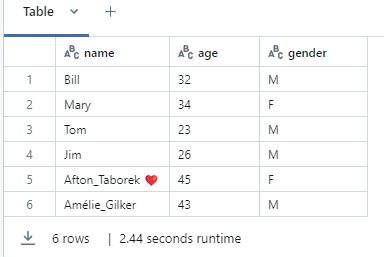
Let’s say, there is dataframe

Partitioning in Databricks File System (DBFS)

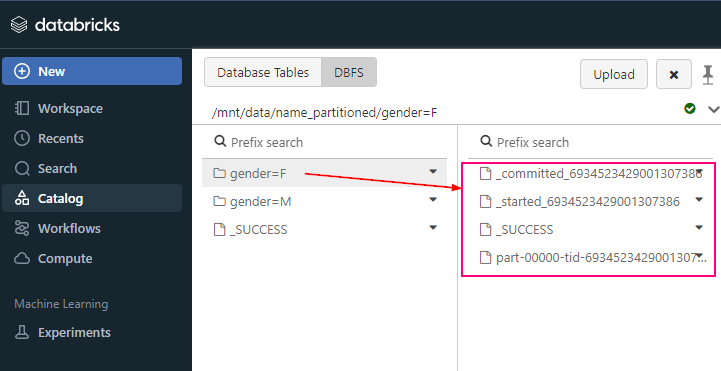
When writing data to files in Databricks (e.g., Parquet, Delta), you can specify partitioning columns to optimize reads and queries. For example, when you partition by a column, Databricks will store the data in different folders based on that column’s values.


# Example of saving a DataFrame with partitioning
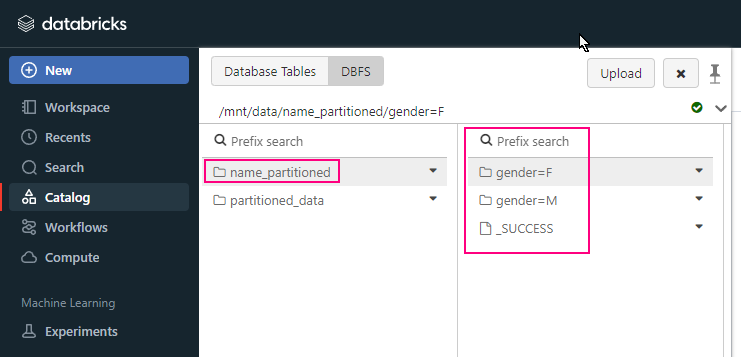
df.write.partitionBy("year", "month").parquet("/mnt/data/name_partitioned")

In this example, the data will be saved in a directory structure like:

/mnt/data/name_partitioned/gender=F
/mnt/data/name_partitioned/gender=M

Partitioning in Delta Tables

In Delta Lake (which is a storage layer on top of Databricks), partitioning is also a best practice to optimize data management and queries. When you define a Delta table, you can specify partitions to enable efficient query pruning, which results in faster reads and reduced I/O.


# Writing a Delta table with partitioning
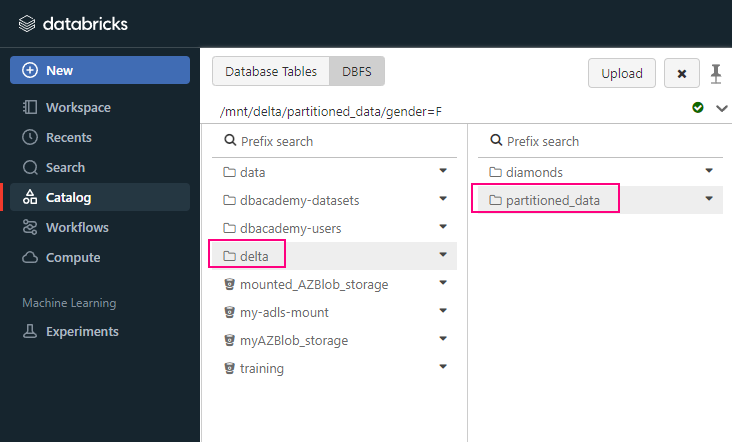
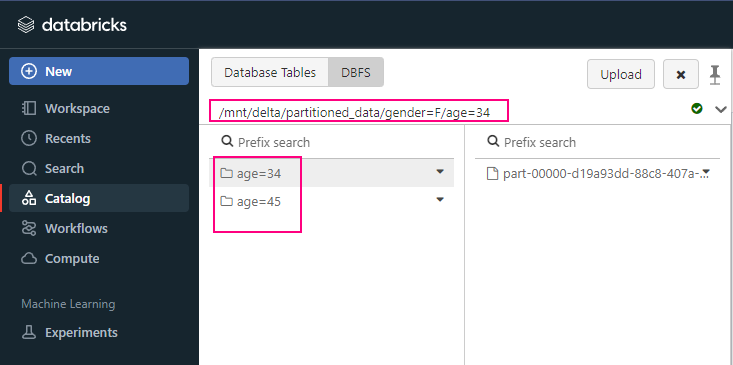
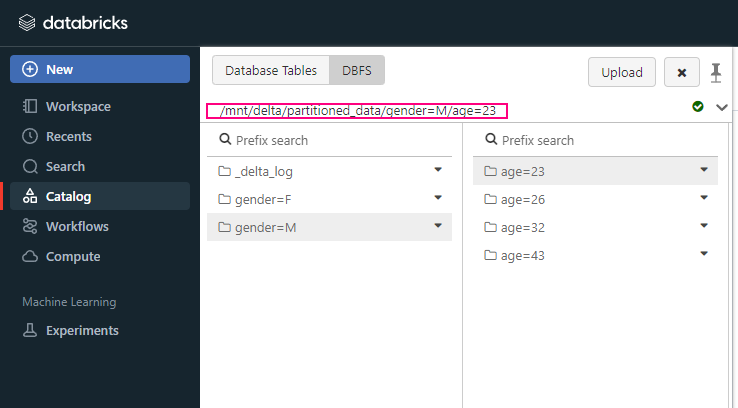
df.write.format("delta").partitionBy("gender", "age").save("/mnt/delta/partitioned_data")

In this example, the data will be saved in a directory structure like:

/mnt/delta/partitioned_data/gender=F/age=34
/mnt/delta/partitioned_data/gender=F/age=45
/mnt/delta/partitioned_data/gender=M/age=23
/mnt/delta/partitioned_data/gender=M/age=26
/mnt/delta/partitioned_data/gender=M/age=32
/mnt/delta/partitioned_data/gender=M/age=43

Optimizing Spark DataFrame Partitioning

When working with in-memory Spark DataFrames in Databricks, you can manually control the number of partitions to optimize performance.

Repartition

This increases or decreases the number of partitions.
This operation reshuffles the data, redistributing it into a new number of partitions.


df = df.repartition(10)  # repartition into 10 partitions

Coalesce

This reduces the number of partitions without triggering a shuffle operation (which is often more efficient than repartition).
This is a more efficient way to reduce the number of partitions without triggering a shuffle.


df = df.coalesce(5) # reduce partitions to 5

When to Use Partitioning

  • Partitioning works best when you frequently query the data using the columns you’re partitioning by. For example, partitioning by date (e.g., year, month, day) is a common use case when working with time-series data.
  • Don’t over-partition: Too many partitions can lead to small file sizes, which increases the overhead of managing the partitions.

Key Notes

  • Partitioning Cannot Change: If partitioning changes are needed, you must recreate the table.

Summary

  • Partitioning divides data into smaller, more manageable chunks.
  • It improves query performance by allowing Spark to read only relevant data.
  • You can control partitioning when saving DataFrames or Delta tables to optimize storage and query performance.
  • Use repartition() or coalesce() to manage in-memory partitions for better parallelization.
  • Use coalesce() to reduce partitions without shuffling.
  • Use repartition() when you need to rebalance data.

Please do not hesitate to contact me if you have any questions at William . chen @ mainri.ca

(remove all space from the email account 😊)

Comparison between All-Purpose Cluster, Job Cluster, SQL Warehouse and Instance Pools

side-by-side comparison of “All-Purpose Cluster”, “Job Cluster”, “SQL Warehouse” and Instance Pools in Azure Databricks, covering their key features, use cases, and differences:

Key Differences

  • All-Purpose Cluster: Best for interactive workloads, collaborative notebooks, and exploration. It stays running until you manually stop it or it hits the idle timeout. Not as cost-effective for long-running or scheduled tasks.
  • Job Cluster: Best for scheduled and automated jobs. It starts automatically when the job begins and shuts down after the job finishes, which makes it cost-efficient and ideal for production ETL or data processing jobs.
  • SQL Warehouse: Best for SQL analytics and BI tool integration. It is specifically optimized for SQL queries, offering auto-scaling based on query load and cost-efficient SQL query execution on Delta Lake tables.
  • Instance Pools: Reducing startup times for frequently created clusters. Sharing resources among multiple teams or clusters.

Side by side comparison

All-Purpose ClusterJob ClusterSQL Warehouse (formerly SQL Endpoints)Instance Pools
PurposeGeneral-purpose compute environment for interactive workloads.Dedicated to run a specific job or task. Automatically terminates after the job.Optimized for running SQL queries, dashboards, and BI analytics on Delta Lake.resource management feature that pre-allocate virtual machines (VMs) to reduce cluster startup times and optimize costs.
UsageFor interactive development in notebooks, collaboration, and ad-hoc analysis.For scheduled or automated jobs (e.g., ETL tasks) that need to run Spark-based processing.For SQL-based workloads, querying data in Delta Lake, and BI tools (e.g., Power BI, Tableau).Supporting clusters
Primary WorkloadInteractive development (notebooks, data exploration, ad-hoc queries).Automated Spark jobs with dedicated, isolated clusters for each job.SQL analytics and dashboards, running SQL queries against Delta Lake tables.Resource optimization
Cluster LifecycleRemains active until manually terminated or idle timeout is reached.Created automatically when a job is triggered, and terminated when the job is done.SQL Warehouses scale up/down based on query demand; remain active based on usage settings.Pre-warmed VMs (idle terminate)
Resource AllocationConfigurable resources, manual start/stop, and autoscaling available.Dynamically allocated resources based on job requirements, with autoscaling.Autoscaling based on SQL query demand; optimized for SQL workloads.
CostAlways running unless manually stopped or auto-terminated, can be expensive if left running.More cost-efficient for scheduled jobs, as the cluster runs only during the job execution.Efficient for SQL queries with autoscaling; cost based on query execution.Optimizes cluster creation
PerformanceGood for interactive, collaborative workloads but may incur higher costs if not optimized.Highly performant for running isolated, parallel jobs without interference from other workloads.Optimized for low-latency SQL query performance and concurrent query execution.
ScalingCan scale automatically based on workload demand (within limits set by the user).Scales based on the job’s needs; new clusters can be created for each job.Scales automatically to accommodate concurrent SQL queries.
IsolationNot isolated — multiple users can share the cluster, which may impact performance.Fully isolated — each job runs on a separate cluster.Isolated SQL queries but shared resources for concurrent workloads.Shared resource pool
Ideal ForData exploration, notebook development, machine learning experiments, ad-hoc queries.Scheduled ETL/ELT jobs, production jobs, or one-time data processing tasks.SQL analytics, dashboards, and BI tool integration for querying Delta Lake.Supporting clusters
Supported LanguagesPython, Scala, R, SQL, and more via notebooks.Python, Scala, R, SQL (job-specific).SQL only.
ManagementRequires manual monitoring and termination.Automatic termination after job completion.Automatically managed scaling and uptime based on usage.Faster cluster launches
Example Use CaseRunning notebooks to explore and analyze data, performing machine learning experiments.Running a scheduled Spark job that processes data in a pipeline or transformation.Running SQL queries on Delta Lake, powering dashboards, or connecting to BI tools.
Restart BehaviorCan be manually stopped and restarted; the Cluster ID remains the same.Automatically created and terminated for each job run; new Cluster ID for each job.SQL Warehouse remains active based on usage, auto-scaling handles load; Warehouse ID remains the same.Faster cluster launches
Side by side clusters comparisons.

Summary:

  • All-Purpose Clusters are ideal for interactive data exploration and multi-user environments, but they can be costly if left running for too long.
  • Job Clusters are used for single, isolated tasks (like scheduled ETL jobs) and are cost-effective since they are automatically created and terminated.
  • SQL Warehouses are specialized for SQL queries and business intelligence reporting, offering cost efficiency through on-demand scaling for SQL analytics.

Please do not hesitate to contact me if you have any questions at William . chen @ mainri.ca

(remove all space from the email account 😊)

DBFS: Access database read/write database using JDBC

Read/Write Data from Sql Database using JDBC

jdbc connect to database

Define the JDBC URL and connection properties


jdbc_url = "jdbc:sqlserver://<server>:<port>;databaseName=<database>"

connection_properties = {
    "user": "<username>",
    "password": "<password>",
    "driver": "com.microsoft.sqlserver.jdbc.SQLServerDriver"
}

Read data from the SQL database

df = spark.read.jdbc(url=jdbc_url, table="", properties=connection_properties)

Write data to the SQL database

df.write.jdbc(url=jdbc_url, table="", mode="overwrite", properties=connection_properties)

example

# Parameters
server_name = "myserver.database.windows.net"
port = "1433"
database_name = "mydatabase"
table_name = "mytable"
username = "myusername"
password = "mypassword"

# Construct the JDBC URL
jdbc_url = f"jdbc:sqlserver://{server_name}:{port};databaseName={database_name}"
connection_properties = {
    "user": username,
    "password": password,
    "driver": "com.microsoft.sqlserver.jdbc.SQLServerDriver"
}

# Read data from the SQL database
df = spark.read.jdbc(url=jdbc_url, table=table_name, properties=connection_properties)

# Perform any transformations on df if needed

# Write data to the SQL database
df.write.jdbc(url=jdbc_url, table=table_name, mode="overwrite", properties=connection_properties)

Please do not hesitate to contact me if you have any questions at William . chen @ mainri.ca

(remove all space from the email account 😊)

Appendix: